> For the complete documentation index, see [llms.txt](https://docs.antbuddy.com/llms.txt). Markdown versions of documentation pages are available by appending `.md` to page URLs; this page is available as [Markdown](https://docs.antbuddy.com/tai-lieu-antbuddy-huong-dan-su-dung-antbuddy-docs-user-guide/huong-dan-su-dung-quan-tri-khach-hang-antcrm-antcrm-customer-management/quan-ly-trai-nghiem-khach-hang-customer-experience-management/1.-thiet-lap-khao-sat-khach-hang-customer-survey-setting/1.1.-chat-da-kenh-conversations.md). Agents can also search and read this documentation through its [MCP server](https://docs.antbuddy.com/~gitbook/mcp).

# 1.1. Chat đa kênh(Conversations)

Sử dụng để gửi survey cho khách hàng qua các kênh tin nhắn Facebook, Instagram, Zalo

*(* Conversation&#x73;*: Used to send surveys to customers via messaging channels such as Facebook, Instagram, Zalo.)*

Vào Mẫu khảo sát để lựa chọn loại khảo sát mong muốn để khởi tạo

*(Go to the Survey Template to select the desired survey type to initiate.)*

Bước 1: Vào Khảo sát -> Mẫu khảo sát

(Step 1: Go to Survey -> Survey Template)

Bước 2: Chọn tab Tin nhắn đa kênh

*(Step 2: Select tab* Conversation&#x73;*)*

Bước 3: Bấm nút Tạo mẫu mới ![](https://lh7-rt.googleusercontent.com/docsz/AD_4nXeYvzwwgWu7sKJX1d3KvEazl519s7Kv3DDK_Pu_4c9DUM1BVdVFSJY9P7CExhc2OZgnx-KpKKqmJdQjrONXrx8hLAl8CrzmAdGu54rP9LPucaTQKgFuzmujwEaf_RAeWPH2e53Cyw?key=kGLHDV7QUZdDF4FSQBuBmbfF)

*(Step 3: Click on create new template*  ![](https://2303854476-files.gitbook.io/~/files/v0/b/gitbook-x-prod.appspot.com/o/spaces%2FeTpJl0u63dzYBMNgXKfR%2Fuploads%2F66sErHsOrpbHFUWUr2Nw%2Fimage.png?alt=media\&token=6cbe2541-cd30-44b6-b4ed-28d4f0412f6a) *)*

<figure><img src="https://2303854476-files.gitbook.io/~/files/v0/b/gitbook-x-prod.appspot.com/o/spaces%2FeTpJl0u63dzYBMNgXKfR%2Fuploads%2FJvRhdkfKI4JB0aGRFqg1%2Fimage.png?alt=media&amp;token=2b351360-68a2-4f48-99c3-ac8ec22f1278" alt=""><figcaption></figcaption></figure>

<figure><img src="https://2303854476-files.gitbook.io/~/files/v0/b/gitbook-x-prod.appspot.com/o/spaces%2FeTpJl0u63dzYBMNgXKfR%2Fuploads%2FsfhLYHSRqO4d4TbJmJxP%2Fimage.png?alt=media&amp;token=617d8ab4-f74e-4173-b91b-769c926fcfc4" alt=""><figcaption></figcaption></figure>

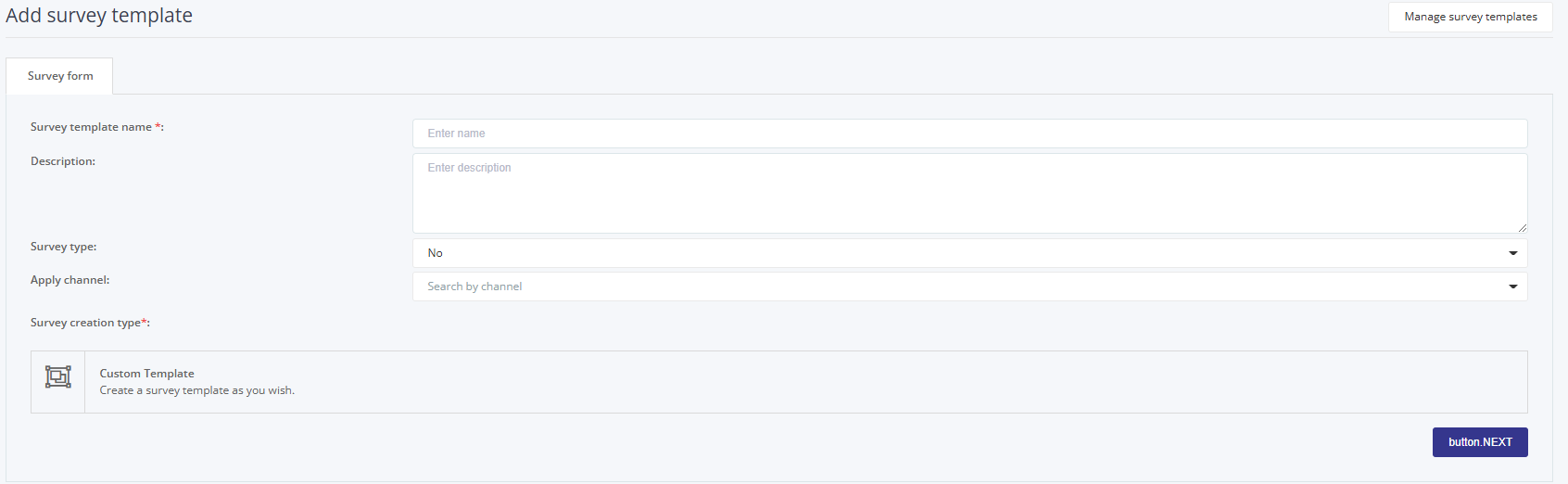
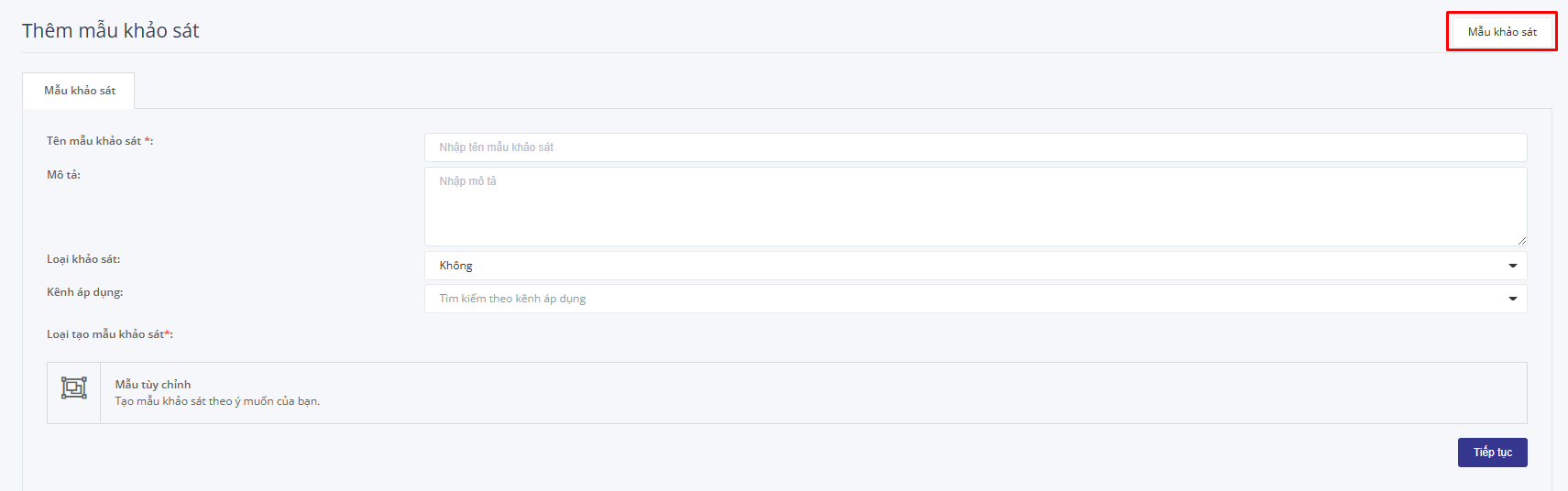
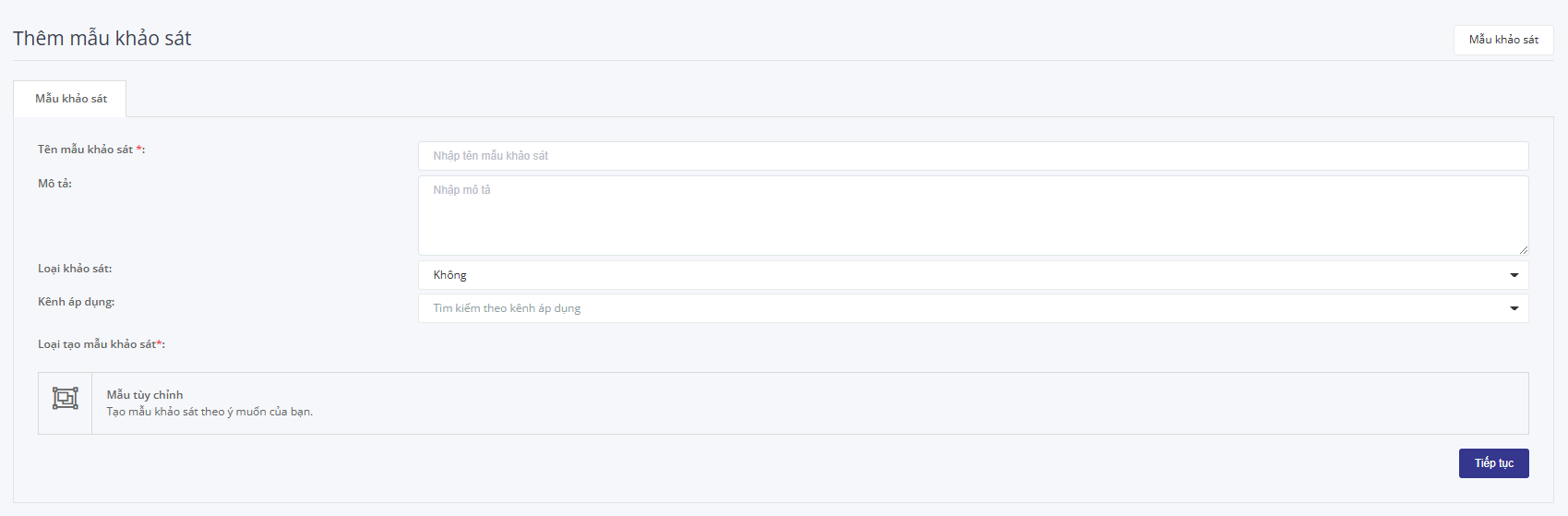
Bước 4: Điền thông tin

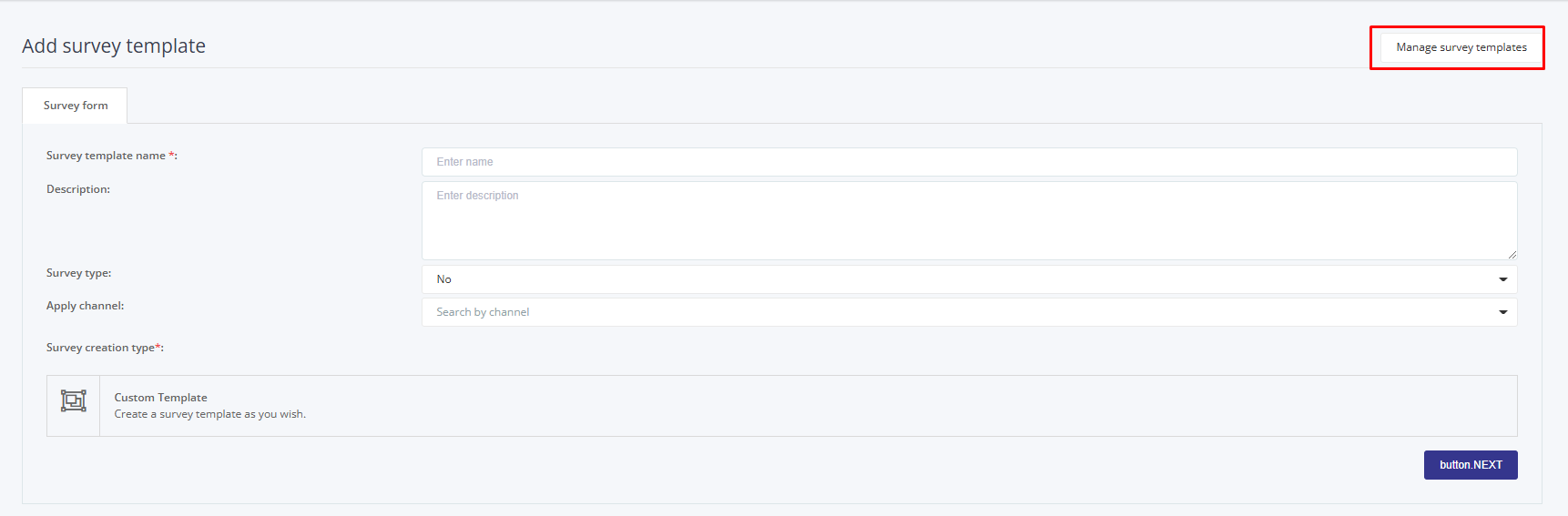
*(Step 4: Filling the information)*

* Tên mẫu khảo sát (bắt buộc)

*(Survey template name (required))*

* Mô tả

*(Description)*

* Loại khảo sát: CSAT/NPS

*(Survey types: CSAT/NPS)*

* Kênh áp dụng: FACEBOOK/ZALO/INSTAGRAM

*(Applicable channels: FACEBOOK/ZALO/INSTAGRAM)*

Bước 5: Bấm chọn Mẫu tùy chỉnh

*(Step 5: Click on customer template)*

Bước 6: Bấm Tiếp tục

*(Step 6: Click continue)*

Bước 7: Chọn kích hoạt Số tin nhắn tối đa / phiên chat

*(Step 7: Select to activate the Maximum Number of Messages / Conversation Session)*

<figure><img src="https://2303854476-files.gitbook.io/~/files/v0/b/gitbook-x-prod.appspot.com/o/spaces%2FeTpJl0u63dzYBMNgXKfR%2Fuploads%2FiKG37F5qQPRdrzlJGS7j%2Fimage.png?alt=media&amp;token=98484460-bb27-4418-af6d-103849542849" alt=""><figcaption></figcaption></figure>

<figure><img src="https://2303854476-files.gitbook.io/~/files/v0/b/gitbook-x-prod.appspot.com/o/spaces%2FeTpJl0u63dzYBMNgXKfR%2Fuploads%2FVyIgVgjOtZHQxqvo0618%2Fimage.png?alt=media&amp;token=582d6e72-329c-4173-9ce4-d91d3d9e9c9d" alt=""><figcaption></figcaption></figure>

Bước 8: Chọn kích hoạt Tự động gửi đánh giá, trong đó có thể chọn danh mục cấp 1/cấp 2/cấp 3 của   đoạn  chat để tự động gửi

*(**Step 8:** Select to activate Automatic Rating sending, where you can choose the 1st/2nd/3rd-level categories of the conversation to send automatically.)*

Lưu ý: Khi muốn ẩn/xóa danh mục chat ở thiết lập Omni, để tránh ảnh hưởng tới tính năng, người dùng cần gỡ bỏ danh mục cần ẩn/xóa ở thiết lập này trước

*(**Note:** When you want to hide/delete a conversation category in the Omni settings, to avoid affecting the feature, users must remove the category they want to hide/delete from this setting first.)*

<figure><img src="https://2303854476-files.gitbook.io/~/files/v0/b/gitbook-x-prod.appspot.com/o/spaces%2FeTpJl0u63dzYBMNgXKfR%2Fuploads%2FIi2ZerMgzdJEWVHmpYtq%2Fimage.png?alt=media&amp;token=a49fdb6d-12dd-48a9-a624-cb54a18155b3" alt=""><figcaption></figcaption></figure>

<figure><img src="https://2303854476-files.gitbook.io/~/files/v0/b/gitbook-x-prod.appspot.com/o/spaces%2FeTpJl0u63dzYBMNgXKfR%2Fuploads%2FYsZJD8LOegUZn6ShNjVB%2Fimage.png?alt=media&amp;token=92e791a0-e5a4-4911-84a1-be56cfb5f2bf" alt=""><figcaption></figcaption></figure>

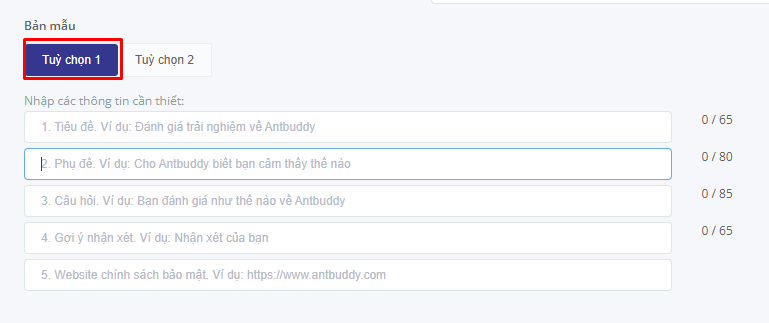
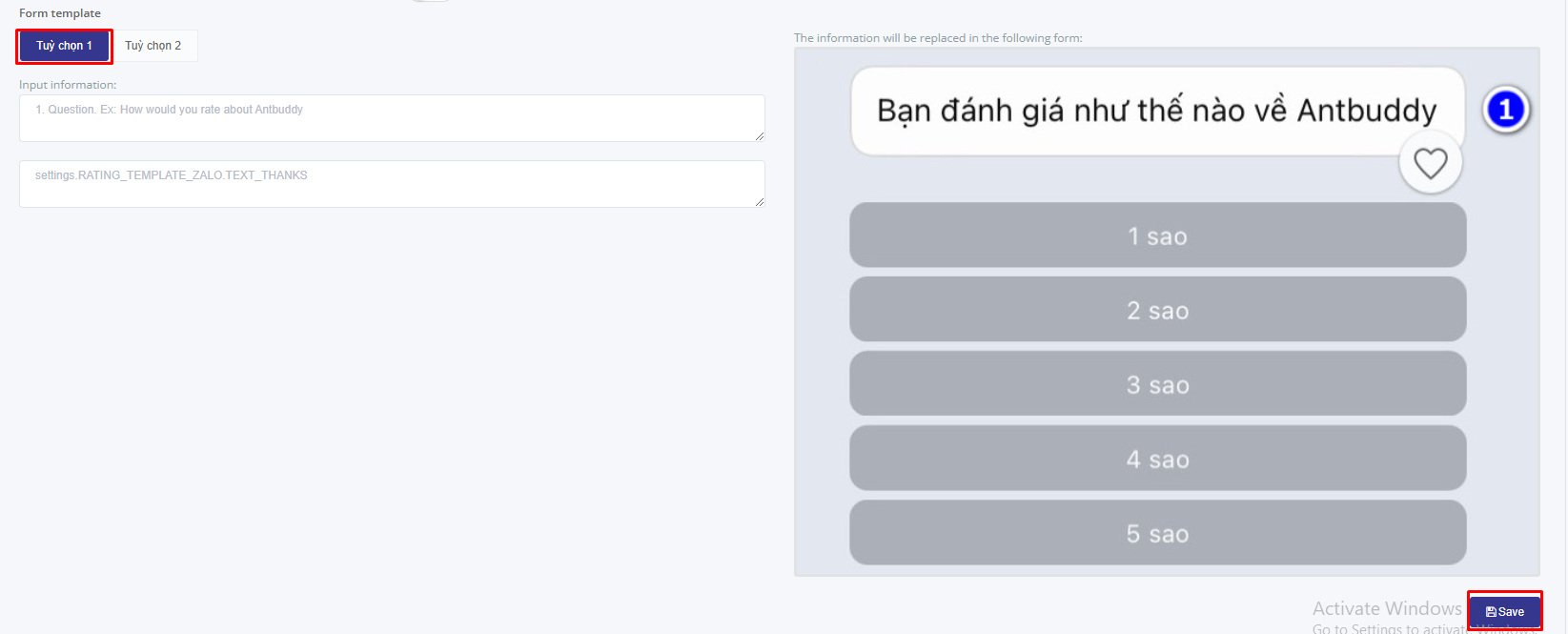
Bước 9: Tại Bản mẫu, có 2 tùy chọn gửi mẫu khẩu sát

*(Step 9: In the Template, there are 2 options to send the survey template.)*

\+ Tùy chọn 1: Gửi mẫu đánh giá rating qua các kênh. Tại đây chỉ cần nhập thông tin, sau đó bấm nút "lưu"

*(Option 1: Send the rating survey through channels. Here, you just need to enter the information and then click "save" button.)*

<figure><img src="https://2303854476-files.gitbook.io/~/files/v0/b/gitbook-x-prod.appspot.com/o/spaces%2FeTpJl0u63dzYBMNgXKfR%2Fuploads%2FIE89NyhC8HjIb4nb0ogQ%2Fimage.png?alt=media&amp;token=4c59909f-e743-4335-bcba-56db094888dc" alt=""><figcaption></figcaption></figure>

<figure><img src="https://2303854476-files.gitbook.io/~/files/v0/b/gitbook-x-prod.appspot.com/o/spaces%2FeTpJl0u63dzYBMNgXKfR%2Fuploads%2Fmt2C2Nm9QE5IC86KozLb%2Fimage.png?alt=media&amp;token=35004ad1-39a7-400a-b5e4-0a7bfe7c1350" alt=""><figcaption></figcaption></figure>

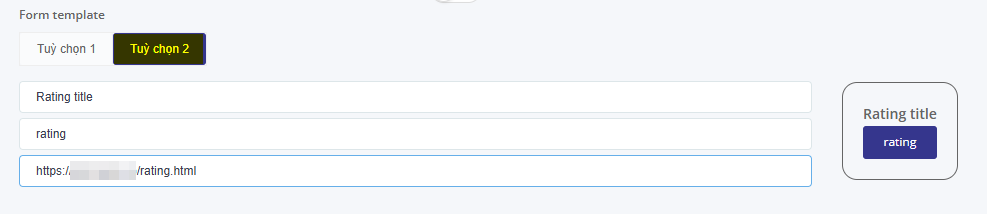
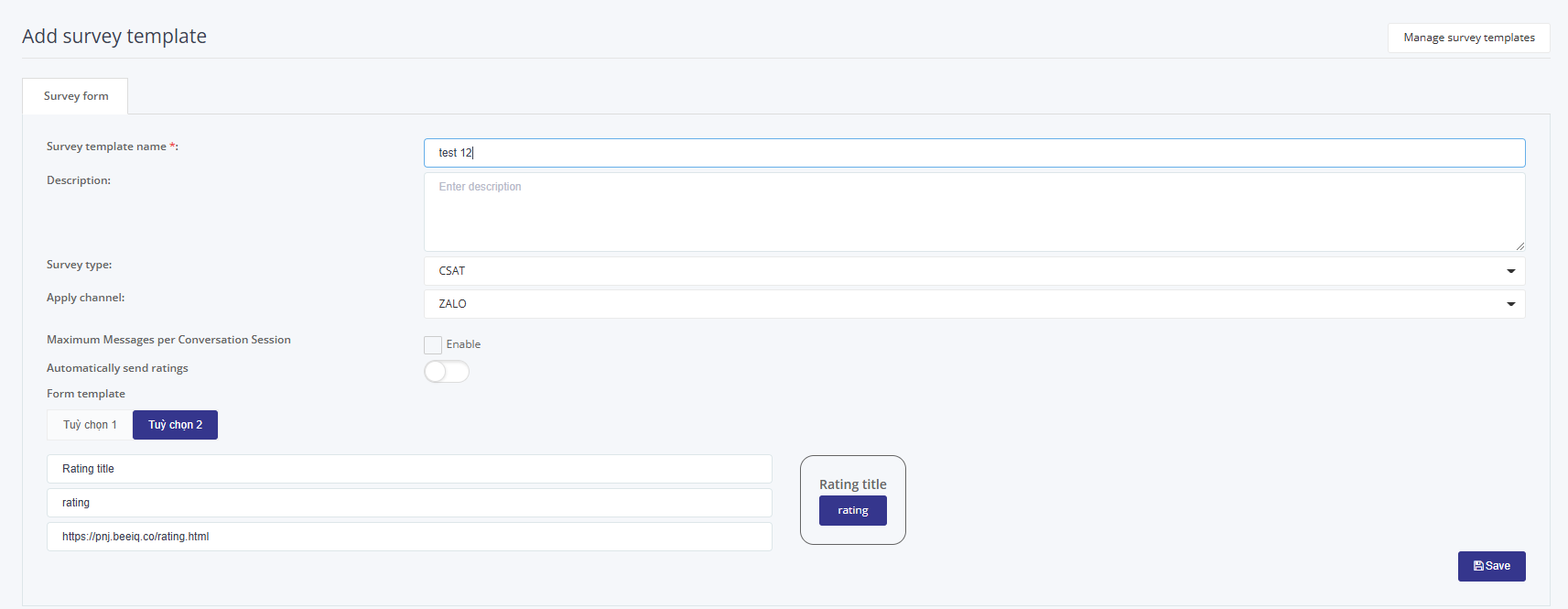
\+ Tùy chọn 2: Chọn gửi qua Landing page

*(Option 2: Select send via Landing page)*

* Bản mẫu: Chọn mẫu 2 để thực hiện gửi LDP, trong đó điền các thông tin như:

(*Template: Choose Template 2 to send the LDP, where you need to fill in the following information:)*

* Nhập tiêu đánh giá

*(Enter rating criteria)*

* Nhập tên nút

*(Enter button name)*

* Nhập link đánh giá: https\://\<domain>.beeiq.co/rating.html

*(Enter rating link:* https\://\<domain>.beeiq.co/rating.htm&#x6C;*)*

<figure><img src="https://2303854476-files.gitbook.io/~/files/v0/b/gitbook-x-prod.appspot.com/o/spaces%2FeTpJl0u63dzYBMNgXKfR%2Fuploads%2FNeWWB1jbwksdbz5PATW7%2Fimage.png?alt=media&amp;token=f7feab70-58d5-40e7-a4db-f6e6aaba9f06" alt=""><figcaption></figcaption></figure>

<figure><img src="https://2303854476-files.gitbook.io/~/files/v0/b/gitbook-x-prod.appspot.com/o/spaces%2FeTpJl0u63dzYBMNgXKfR%2Fuploads%2FOL014aaxIQOdMhEiHOSS%2Fimage.png?alt=media&amp;token=e7f8fe7c-2572-4f44-b4ed-9a2aba90a126" alt=""><figcaption></figcaption></figure>

Bước 10: Bấm nút "Lưu"

*(Step 10: Click on "save" button)*

<figure><img src="https://lh7-rt.googleusercontent.com/docsz/AD_4nXfPBwo7MjmtTGHYOyhWhcCa8aOG3TyVHSbzVPGsPRYP1LHnoXwYVZWTbZjUZ2DI63kVfSRzf07gE2pW-JFc2OaQDpU1_gHr_KyIAEnhWNwUhCR78lUdauCnie5uxHbidbu5aBw11A?key=hX0gjC0BLwlnnhJxr9HZ-3Sx" alt=""><figcaption></figcaption></figure>

<figure><img src="https://2303854476-files.gitbook.io/~/files/v0/b/gitbook-x-prod.appspot.com/o/spaces%2FeTpJl0u63dzYBMNgXKfR%2Fuploads%2FiQC8GKzfDR4lKpoCaI65%2Fimage.png?alt=media&amp;token=c5b83d39-0c0a-4fa5-8bb9-c7b506248218" alt=""><figcaption></figcaption></figure>

Bước 11: Bấm vào Mẫu khảo sát ![](https://lh7-rt.googleusercontent.com/docsz/AD_4nXeyrlfWVW7CQFzW41wEe_dgh_c6dl6P6NePygArPgkobcqvM6LZDnhEzGkJZMWZUn8wXP-dg2z73qbX8PA9lEVHmYoPBADivCHT-TB-amNi2RaqJGXjcJNG9IXJTG9PdHtjlq4nbg?key=hX0gjC0BLwlnnhJxr9HZ-3Sx)để quay về danh sách mẫu, chọn Active mẫu

*(Step 11: Click on the Survey Template* ![](https://2303854476-files.gitbook.io/~/files/v0/b/gitbook-x-prod.appspot.com/o/spaces%2FeTpJl0u63dzYBMNgXKfR%2Fuploads%2F6CCLwm5T9hHvgC22xg6A%2Fimage.png?alt=media\&token=42b85fc6-83f6-481b-b980-fed8efbf9f61)*to return to the template list, and select the Active template.)*
<figure><img src="https://2303854476-files.gitbook.io/~/files/v0/b/gitbook-x-prod.appspot.com/o/spaces%2FeTpJl0u63dzYBMNgXKfR%2Fuploads%2FLAMVS4zyac9ynAMrmkqO%2Fimage.png?alt=media&amp;token=a2c87638-c6fc-4018-b1d4-c9bb99e21640" alt=""><figcaption></figcaption></figure>

<figure><img src="https://2303854476-files.gitbook.io/~/files/v0/b/gitbook-x-prod.appspot.com/o/spaces%2FeTpJl0u63dzYBMNgXKfR%2Fuploads%2FEyk5pEArCQiR958a1tIp%2Fimage.png?alt=media&amp;token=7196df77-3713-4829-ba77-b89548a07f9e" alt=""><figcaption></figcaption></figure>