> For the complete documentation index, see [llms.txt](https://docs.antbuddy.com/llms.txt). Markdown versions of documentation pages are available by appending `.md` to page URLs; this page is available as [Markdown](https://docs.antbuddy.com/tai-lieu-antbuddy-huong-dan-su-dung-antbuddy-docs-user-guide/huong-dan-su-dung-quan-tri-khach-hang-antcrm-antcrm-customer-management/ban-hang-omnichannel-sales/dat-lich-bookings/cau-hinh-bat-tat-hien-thi-notification-khi-co-lich-moi-configure-on-screen-notification-when-an-ap.md).
# Cấu hình bật tắt hiển thị notification khi có lịch mới (Configure On-screen Notification When an Ap)
#### Bước 1: Truy cập Cài đặt
**Step 1: Access Settings**
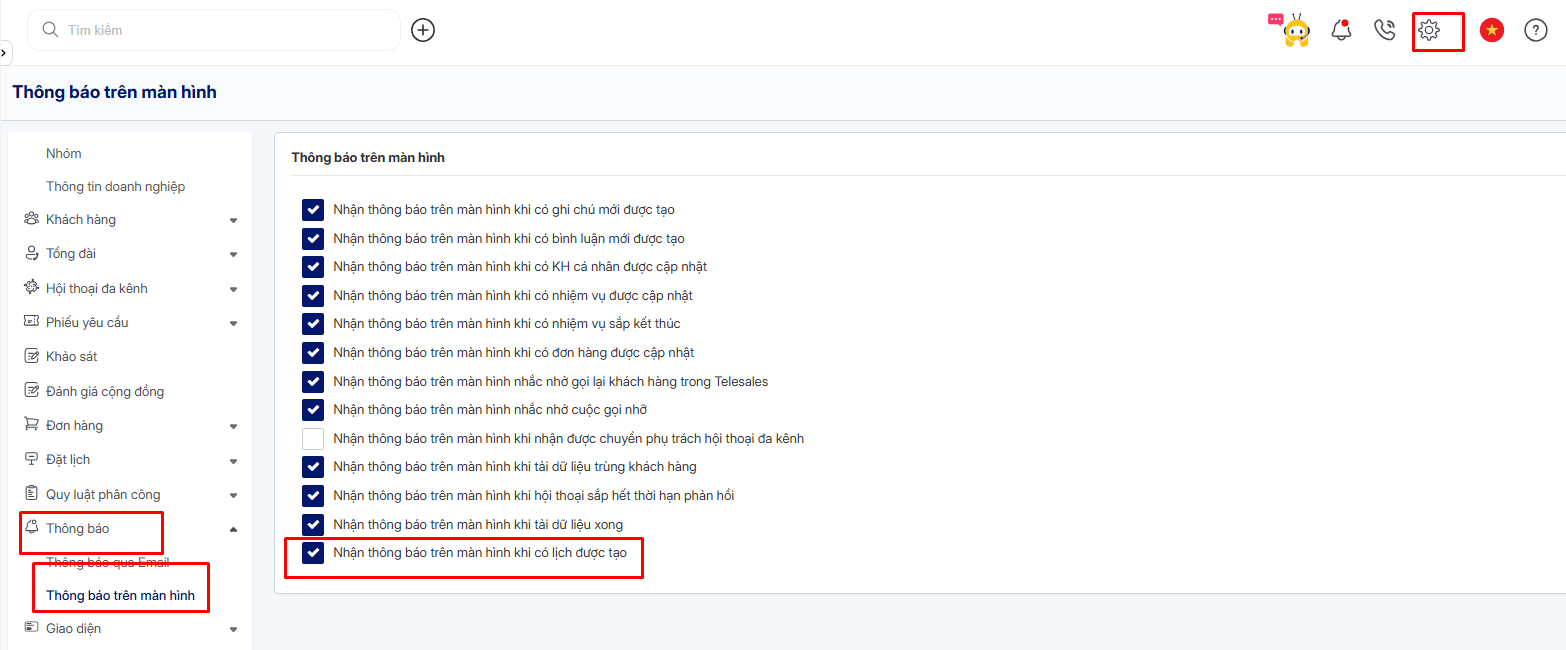
* Nhấn vào **biểu tượng Cài đặt (⚙️)** ở góc trên bên phải màn hình.
* Click the **Settings (⚙️)** icon at the **top-right corner** of the screen.
#### Bước 2: Chọn mục Thông báo
**Step 2: Go to Notification Settings**
* Trong menu bên trái, chọn **Thông báo**.
* In the left sidebar menu, select **Notification**.
#### Bước 3: Chọn Thông báo trên màn hình
**Step 3: Select On-screen Notification**
* Nhấn vào **Thông báo trên màn hình**.
* Click **On-screen Notification**.
#### Bước 4: Bật thông báo khi có lịch được tạo
**Step 4: Enable Notification for New Appointment Creation**
* Tích chọn **“Nhận thông báo trên màn hình khi có lịch được tạo”**.
* Check **“Receive on-screen notification when an appointment is created.”**
#### Bước 5: Lưu cấu hình
**Step 5: Save the Configuration**
* Lưu lại cài đặt để áp dụng thay đổi.
* Save the settings to apply the changes.
✅ Khi bật tùy chọn này, **người quản lý chi nhánh** sẽ **nhận thông báo trực tiếp trên màn hình khi có lịch đặt mới được tạo trong hệ thống**.\
✅ Once enabled, branch managers will receive an on-screen notification whenever a new appointment is created in the system.