# Cho phép xuất dữ liệu AntCRM Data Platform (Guide to enable data export from AntCRM Data Platform)

### 1. Giới thiệu (1. Introduction)

AntCRM Data platform cho phép người sử dụng xuất dữ liệu từ AntCRM Data Platform ra những hệ thống bên ngoài để phục vụ các công việc trên hệ thống đó theo dõi, thông báo, cập nhật dữ liệu. Tài liệu này dùng để hướng dẫn cách thực hiện xuất dữ liệu từ AntCRM Data Platform một cách tự động.\
\
(AntCRM Data platform allows users to export data from AntCRM Data Platform to external systems to serve work on that system to monitor, notify and update data. This document is used to guide how to perform data export from AntCRM Data Platform automatically.)

### 2. Hướng dẫn cấu hình (2. Configuration instruction)

#### 2.1. Hướng dẫn Cấu hình AntCRM Webhook URL (2.1. AntCRM Webhook URL configuration instruction)

Để xuất dữ liệu từ hệ thống AntCRM Data Platform ra bên ngoài, người dùng cần phải được cài đặt Webhook URL cho tài khoản của riêng mình. URL này là đường dẫn của hệ thống mà người dùng muốn đưa dữ liệu ra ngoài từ AntCRM Data Platform. Mỗi tài khoản người dùng có thể chèn nhiều URL cho nhiều mục đích. Để cấu hình URL này, người dùng cần đăng nhập hệ thống bằng Chỉ có tài khoản admin hoặc owner mới có quyền cấu hình URL. Các bước thực hiện cụ thể như bên dưới:\
\
(To export data from the AntCRM Data Platform system to the outside, users need to install a Webhook URL for their own account. This URL is the path of the system which the user wants to export data from AntCRM Data Platform. Each user account can insert many URLs for many purposes. To configure this URL, users need to log in to the system with only admin or owner accounts have the right to configure URL.The specific steps are as below:)

Bước 1: Vào phần Thiết lập → chọn Thiết lập khác → chọn Webhook\
(Step 1: Enter Setting → choose Other setting → choose Webhook)

<figure><img src="/files/hLK526O2E9Y5F8rtIUBC" alt=""><figcaption></figcaption></figure>

<figure><img src="/files/oLF0rsT74xwGvm20JaEq" alt=""><figcaption></figcaption></figure>

Bước 2: Chọn Tab Webhook\
(Step 2: Choose Webhook Tab)

<figure><img src="/files/Qv3JuHbbUT1ZJzH4pNCP" alt=""><figcaption></figcaption></figure>

<figure><img src="/files/2iQOd47jfUG1YRMyKk34" alt=""><figcaption></figcaption></figure>

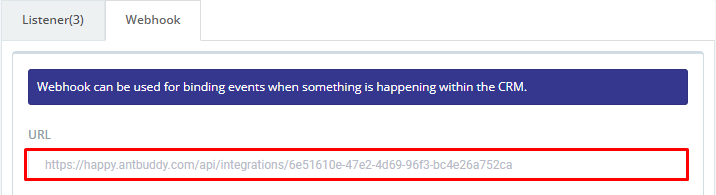
Bước 3: Nhập URL của hệ thống mà bạn muốn xuất dữ liệu đến ra ngoài\
(Step 3: Enter URL of the system that you want to export data)

<figure><img src="https://lh3.googleusercontent.com/4Afy8htig42_ryvVcI1B4Drj-hDriMxHx4C-rvG4XyEJCe1LVbLGWv3CjZ_LGdVEA9HFW9TpY_uTo-yjJsDRzSaEis5055ojRXYEcG8HGqBr5IbscHXy2M4qHqxJkRxu9vf-1WHHpJFrSD3M2mcSqmY" alt=""><figcaption></figcaption></figure>

<figure><img src="https://lh7-us.googleusercontent.com/-BacpzinkcDmvwIlDAL7mm0E0exqMLlKDuI0LQYPW926mJYa_TKUp4KjjAwNr1qPMgTknfYuhXgkKdsMoYiKOEadbMtMp0qxSuREqvOlcmb78i4E59IBFeM7fZXzzeNvI0brAVLTb7d0w1dUgNIGdQc" alt=""><figcaption></figcaption></figure>

Bước 4: Cấu hình điều kiện để AntCRM Data Platform gửi sự kiện ra ngoài → chọn Thêm Webhook\
(Step 4: Configure the condition to AntCRM Data Platform send the event out → choose Thêm Webhook)

<figure><img src="/files/RVBmvV4yx0jsWhYn6F3F" alt=""><figcaption></figcaption></figure>

<figure><img src="/files/mB2qGzpg1yi58TcXIhkq" alt=""><figcaption></figcaption></figure>

Lưu ý: Xem mục 2.2. Sự kiện của AntCRM Webhook để tìm hiểu chi tiết các sự kiện mà AntCRM Data Platform cung cấp.\
(Note: View section 2.2. The event of AntCRM Webhook to learn about the details of the events that AntCRM Data Platform provides.)

Sau khi thêm mới Webhook URL, giao diện AntCRM Data Platform sẽ hiển thị như sau\
(After adding new Webhook URL, AntCRM Data Platform interface will display as follow:)

<figure><img src="https://lh5.googleusercontent.com/vAkkB-DZYHsz_WbGbv4_bIV709wnfAHMaQZwcpEGBMwX1JBl6yWUrZOCAwjQ5D9YwZ8eP1_cmkEcvdOVihgW_QTDs3E6FWBqllXbyghLb1_04ZH4_rFnSy3bl7PDq0oP6ItSWHlRkIpn_vAgwfR7baQ" alt=""><figcaption></figcaption></figure>

<figure><img src="https://lh7-us.googleusercontent.com/HW6PhN-9xfjx9RTm78hoKoEgshW0wSvtll2u5sbpRW4siXbjSJ9RvM2ZEcSgFuVaFt2u7TKYHccPhhLp5bqXxAUe-radr3WyiahrUJTaF_t6MuOgcOdPsVdojmnhTzsmxgCmnX5Gn0hGQSB6mPiuyRM" alt=""><figcaption></figcaption></figure>

2.2. Sự kiện của AntCRM Webhook\
(2.2. Event of AntCRM Webhook)

Các sự kiện AntCRM Webhook hỗ trợ đẩy thông tin ra ngoài, được mô tả như bên dưới\
(AntCRM Webhook events support to push information out, described below:)

<table><thead><tr><th width="180.272705078125">Trường thông tin (Information field)</th><th width="147.36358642578125">Sự kiện (Event)</th><th>Mô tả (Description)</th></tr></thead><tbody><tr><td>Khách hàng<br>(Contact)</td><td>Tạo mới<br>(Create new)</td><td>Khi Khách hàng được tạo mới AntCRM Webhook sẽ đẩy thông tin đến Webhook URL đã cấu hình <br>(When a new contact is created, AntCRM Webhook will push information to the configured Webhook URL)</td></tr><tr><td>Khách hàng<br>(Contact)</td><td>Cập nhật (Update)</td><td>Khi Khách hàng được cập nhật AntCRM Webhook sẽ đẩy thông tin đến Webhook URL đã cấu hình <br>(When a contact is updated, AntCRM Webhook will push information to the configured Webhook URL)</td></tr><tr><td>Khách hàng<br>(Contact)</td><td>Thêm ghi chú hoặc comment (Add note or comment)</td><td>Khi Khách hàng được thêm ghi chú AntCRM Webhook sẽ đẩy thông tin đến Webhook URL đã cấu hình (When a contact is added note, AntCRM Webhook will push information to the configured Webhook URL)</td></tr><tr><td><p>Task</p><p>(Nhiệm vụ)</p></td><td>Tạo mới <br>(Create new)</td><td>Khi nhiệm vụ được tạo mới AntCRM Webhook sẽ đẩy thông tin đến Webhook URL đã cấu hình<br>(When a new task is created, AntCRM Webhook will push information to the configured Webhook URL)</td></tr><tr><td>Task<br>(Nhiệm vụ)</td><td>Cập nhật (Update)</td><td>Khi nhiệm vụ được cập nhật AntCRM Webhook sẽ đẩy thông tin đến Webhook URL đã cấu hình <br>(When a task is updated, AntCRM Webhook will push information to the configured Webhook URL)</td></tr><tr><td>Task<br>(Nhiệm vụ)</td><td>Thêm ghi chú<br>(Add note)</td><td>Khi nhiệm vụ được thêm ghi chú AntCRM Webhook sẽ đẩy thông tin đến Webhook URL đã cấu hình <br>(When a task is added note, AntCRM Webhook will push information to the configured Webhook URL)</td></tr><tr><td>Task<br>(Nhiệm vụ)</td><td>Chỉ định (Assign)</td><td>Khi nhiệm vụ được Assign AntCRM Webhook sẽ đẩy thông tin đến Webhook URL đã cấu hình</td></tr><tr><td>Ticket<br>(Phiếu yêu cầu)</td><td>Tạo mới<br>(Add note)</td><td>Khi Phiếu yêu cầu được tạo mới AntCRM Webhook sẽ đẩy thông tin đến Webhook URL đã cấu hình<br>(When a task is added note, AntCRM Webhook will push information to the configured Webhook URL)</td></tr><tr><td>Ticket<br>(Phiếu yêu cầu)</td><td>Cập nhật <br>(Update)</td><td>Khi Phiếu yêu cầu được cập nhật AntCRM Webhook sẽ đẩy thông tin đến Webhook URL đã cấu hình<br>(When a Ticket is updated, AntCRM Webhook will push information to the configured Webhook URL)</td></tr><tr><td>Ticket<br>(Phiếu yêu cầu)</td><td>Add note<br>(Ghi chú)</td><td>Khi phiếu yêu cầu được thêm ghi chú AntCRM Webhook sẽ đẩy thông tin đến Webhook URL đã cấu hình <br>(When a task is added note, AntCRM Webhook will push information to the configured Webhook URL)</td></tr><tr><td>Ticket<br>(Phiếu yêu cầu)</td><td>Chỉ định (Assign)</td><td>Khi Phiếu yêu cầu được phân công AntCRM Webhook sẽ đẩy thông tin đến Webhook URL đã cấu hình<br>(When a new task is assigned, AntCRM Webhook will push information to the configured Webhook URL)</td></tr><tr><td>Đơn hàng<br> (Order)</td><td>Tạo mới<br>(Create new)<br></td><td>Khi Đơn hàng được tạo mới AntCRM Webhook sẽ đẩy thông tin đến Webhook URL đã cấu hình<br>(When a new order is created, AntCRM Webhook will push information to the configured Webhook URL)</td></tr><tr><td>Đơn hàng<br>(Order)</td><td>Cập nhật<br>(Update)<br></td><td>Khi Đơn hàng được cập nhật AntCRM Webhook sẽ đẩy thông tin đến Webhook URL đã cấu hình<br>(When a new Order is updated, AntCRM Webhook will push information to the configured Webhook URL)</td></tr><tr><td>Đơn hàng<br> (Order)</td><td>Thêm ghi chú<br>(Add note)</td><td>Khi Giao Đơn hàng thêm ghi chú AntCRM Webhook sẽ đẩy thông tin đến Webhook URL đã cấu hình<br>(When a new Order is added note, AntCRM Webhook will push information to the configured Webhook URL)</td></tr></tbody></table>

2.3. Mô tả tham số\
(2.3. Parameter description)

Dưới đây là bảng mô tả các tham số của AntCRM Data platform\
(Below is a table describing the AntCRM Data platform parameters)

<table data-header-hidden><thead><tr><th width="136.45452880859375">Field Name</th><th width="132.18182373046875">Kiểu (Type)</th><th>Mô tả (Description)</th></tr></thead><tbody><tr><td>eventCode</td><td>string</td><td>Xem bảng EventCode <br>(View EventCode table)</td></tr><tr><td>createdBy</td><td>Object </td><td><p>avatar: "/static/avatars/57f2399cd7351a3e75f8aa1a1477998580867"</p><p>email:"tran.le@htklabs.com"</p><p>firstname:"Tran"</p><p>id:"57f2399cd7351a3e75f8aa1a"</p><p>lastname:"Le"</p><p><br></p></td></tr><tr><td>contact</td><td>Object</td><td><p>{lastname:""</p><p>name:"huyen@grandpasgarđến.org"}</p><p><br></p><p>Chú ý: Contact danh cho các event của contact và có liên quan đến contact </p><p>(Note: Contact is for events of the contact and related to the contact.)<br></p></td></tr><tr><td>ticket</td><td>Object </td><td><p>{TicketId:434</p><p>assignedTo:"584a439acdff33ff1756b4df"</p><p>createdBy:"584a439acdff33ff1756b4df"</p><p>followers:[]</p><p>group:"584a4142cdff33ff1756b4d3"</p><p>id:"59b290f6820385fd1e26c3e5"</p><p>title:"Cai dat pfsense cho van phong moi"}</p><p></p><p>Chú ý: <br>(Note:)</p><p>- Ticket dành cho các event liên quan đến ticket <br>(Ticket is for events related to the ticket.)</p><p>- <strong>assignTo</strong> sẽ được populate để lấy thông tin người / group được assigned<br>(<strong>assignTo</strong> will be populated to retrieve information about the person or group assigned.))</p></td></tr><tr><td>task</td><td>Object</td><td><p>{"taskId":3704,</p><p>"assignTo":"5923f118cacbe6ed63bb7bbe",</p><p>"createdBy":"57fb8157fa0e60a8625145a8",</p><p>"completedBy":"5923f118cacbe6ed63bb7bbe",</p><p>"Permit":{"status":1,"users":[]},</p><p>"Id":"59ae89d521f7cfa03f02f8eb"</p><p>}</p><p></p><p>Chú ý: <br>(Note:)</p><p>- Ticket dành cho các event liên quan đến task  <br>(The "Ticket" represents events associated with a task.)</p><p>- assignTo sẽ được populate để lấy thông tin người / group được assigned<br>(The assignTo field will be automatically populated with details of the assigned user or group.)</p></td></tr><tr><td>content</td><td>string</td><td><p>Chuỗi sẽ hiển thị. Ví dụ: </p><p>(The string will display. For example:)<br></p></td></tr><tr><td>link </td><td>string</td><td>https://happy.beeiq.co/contacts/57fb8157fa0e60a8625145a8</td></tr></tbody></table>

Bảng eventCode: \
(eventCode table:)

| CONTACT\_CREATE        | Tạo Khách hàng                     |
| ---------------------- | ---------------------------------- |
| CONTACT\_CHANGE        | Cập nhật Khách hàng                |
| CONTACT\_CHANGE\_STAGE | Cập nhật trạng thái cho Khách hàng |
| TICKET\_CHANGE         | Cập nhật Phiếu yêu cầu             |
| TICKET\_CREATE         | Tạo Phiếu yêu cầu                  |
| TASK\_CREATE           | Tạo Nhiệm vụ                       |
| TASK\_CHANGE           | Cập nhật Nhiệm vụ                  |
| DEAL\_CREATE           | Tạo Đơn hàng                       |
| DEAL\_CHANGE           | Cập nhật Đơn hàng                  |
| NOTE\_CREATE           | Tao ghi chú                        |


---

# Agent Instructions: Querying This Documentation

If you need additional information that is not directly available in this page, you can query the documentation dynamically by asking a question.

Perform an HTTP GET request on the current page URL with the `ask` query parameter:

```
GET https://docs.antbuddy.com/tai-lieu-antbuddy-huong-dan-su-dung-antbuddy-docs-user-guide/quan-tri-khach-hang-antcrm-antcrm-customer-management/cai-dat-settings/cho-phep-xuat-du-lieu-antcrm-data-platform-guide-to-enable-data-export-from-antcrm-data-platform.md?ask=<question>
```

The question should be specific, self-contained, and written in natural language.
The response will contain a direct answer to the question and relevant excerpts and sources from the documentation.

Use this mechanism when the answer is not explicitly present in the current page, you need clarification or additional context, or you want to retrieve related documentation sections.
