> For the complete documentation index, see [llms.txt](https://docs.antbuddy.com/llms.txt). Markdown versions of documentation pages are available by appending `.md` to page URLs; this page is available as [Markdown](https://docs.antbuddy.com/tai-lieu-antbuddy-huong-dan-su-dung-antbuddy-docs-user-guide/quan-tri-khach-hang-antcrm-antcrm-customer-management/cai-dat-settings/moi-nhan-vien-vao-cong-ty-invite-users-to-the-company.md).
# Mời nhân viên vào công ty (Invite users to the company)
**Mời nhân viên vào công ty**
**Invite employees to the company**
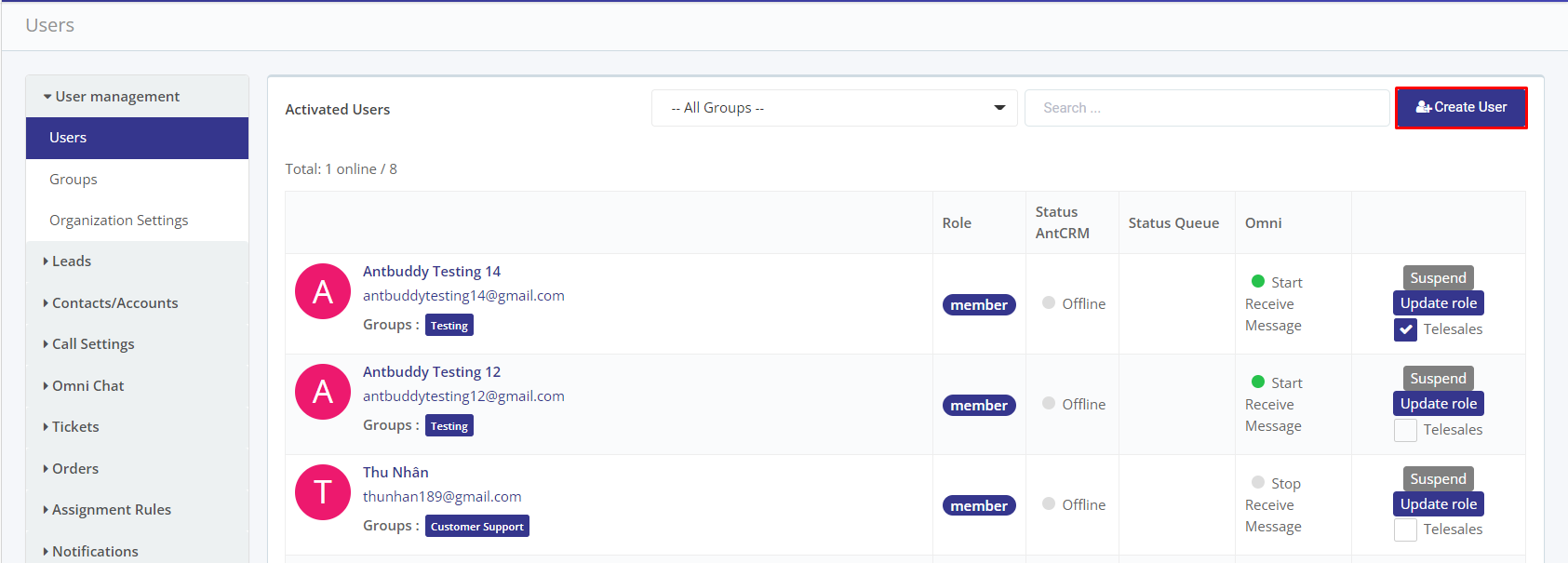
Bước 1. Mở trang **Thiết lập** - **Quản lý người dùng** - **Nhân viên**
(Step 1. Open **Settings** page - **User management** - **Users**)
Bước 2. Nhấn nút **Tạo mới nhân viên**
(Step 2. Press **Create user** button)
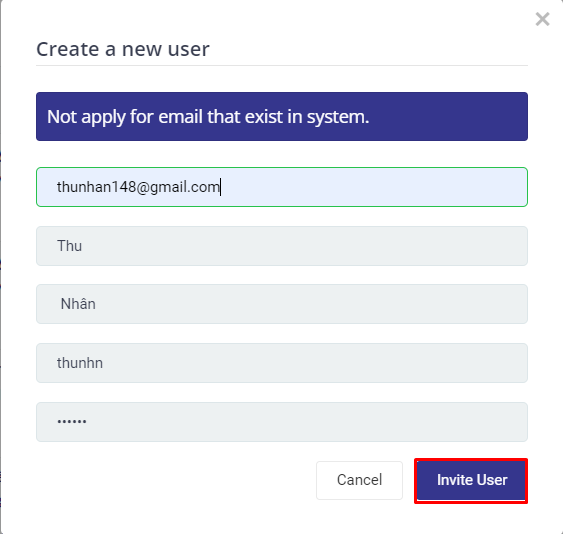
Bước 3. Nhập email muốn mời, bấm nút **Mời nhân viên**
(Step 3. Enter the email that you want to invite and press  button)