> For the complete documentation index, see [llms.txt](https://docs.antbuddy.com/llms.txt). Markdown versions of documentation pages are available by appending `.md` to page URLs; this page is available as [Markdown](https://docs.antbuddy.com/tai-lieu-antbuddy-huong-dan-su-dung-antbuddy-docs-user-guide/huong-dan-su-dung-quan-tri-khach-hang-antcrm-antcrm-customer-management/chat-da-kenh-conversation/facebook-fanpage/1.-tich-hop-facebook-facebook-integration/1.2-dung-tai-khoan-admin-de-tich-hop-use-the-admin-account-of-the-page-to-integrate.md).
# 1.2 Dùng tài khoản admin để tích hợp (Use the Admin account of the page to integrate)
Có 2 trường hợp:
(*There are two cases:)*
**Trường hợp 1:** Nếu bạn chưa đăng nhập Facebook, khi click nút Tích hợp -> Add page -> , trang sẽ mở một hộp thoại yêu cầu đăng nhập Facebook. Bạn phải đăng nhập để tích hợp.\
***(Case 1:** If you are not logged into Facebook, when you click the Integrate button, a dialog box will appear asking you to log in to Facebook. You must log in to integrate.)*
**Lưu ý:** tài khoản đăng nhập phải có ít nhất 1 Fanpage\
Nếu tài khoản của bạn chưa có Fanpage, vui lòng tạo Fanpage theo hướng dẫn [tại đây](/tai-lieu-antbuddy-huong-dan-su-dung-antbuddy-docs-user-guide/huong-dan-su-dung-quan-tri-khach-hang-antcrm-antcrm-customer-management/chat-da-kenh-conversation/facebook-fanpage/2.-thiet-lap-fanpage-facebook-setting-up-facebook-fanpage.md)\
*(**Note**: The account you log in with must have at least one Fanpage.*\
*If your account does not have a Fanpage, please create one following the instructions* [*here*](/tai-lieu-antbuddy-huong-dan-su-dung-antbuddy-docs-user-guide/huong-dan-su-dung-quan-tri-khach-hang-antcrm-antcrm-customer-management/chat-da-kenh-conversation/facebook-fanpage/2.-thiet-lap-fanpage-facebook-setting-up-facebook-fanpage.md)*)*
Sau khi đăng nhập, popup xác nhận tiếp tục với tài khoản hiện tại sẽ bật lên, Click Tiếp tục dưới tên...\
*(After logging in, a popup confirmation to continue with the current account will appear. Click Continue under the name…)*
**Trường hợp 2:** Nếu đã đăng nhập Facebook thì khi click nút Tích hợp, popup xác nhận tiếp tục với tài khoản hiện tại sẽ bật lên, click Tiếp tục dưới tên …\
*(**Case 2:** If logged in with Facebook, when clicking the Integration button, a popup confirmation to continue with the current account will appear. Click Continue under the name …)*
**Lưu ý:** Tài khoản hiện tại phải có ít nhất 1 Fanpage, nếu không đúng tài khoản cần dùng thì click Đăng nhập bằng tài khoản khác để thực hiện đăng nhập lại với đúng tài khoản có Fanpage mong muốn.\
*(**Note**: The current account must have at least one Fanpage. If it is not the correct account, click Log in with a different account to log in again with the desired account that has the required Fanpage.)*
**Bước 4.** Tick để chọn các trang sẽ dùng để tích hợp vào AntCRM, click Tiếp tục\
*(**Step 4:** Tick to select the pages to be integrated into AntCRM, then click Continue.)*
Khi tích hợp thành công, màn hình sẽ hiện thông báo “Tích hợp Facebook thành công!” và các trang của bạn sẽ hiện ra\
*(When the integration is successful, a message “Facebook integration successful!” will appear, and your pages will be displayed.)*
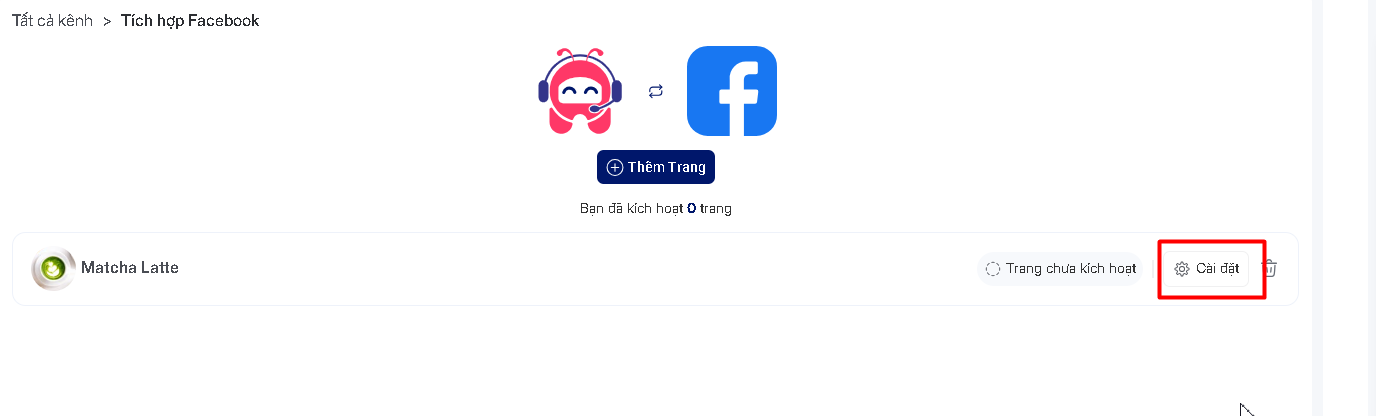
**Bước 5:** Chọn trang mà bạn muốn đăng ký, click nút cài đặt. Dưới đây là màn hình đăng ký thành công.\
*(**Step 5:** Select the page you want to register, then click the settings button. Below is the screen showing successful registration.)*