> For the complete documentation index, see [llms.txt](https://docs.antbuddy.com/llms.txt). Markdown versions of documentation pages are available by appending `.md` to page URLs; this page is available as [Markdown](https://docs.antbuddy.com/tai-lieu-antbuddy-huong-dan-su-dung-antbuddy-docs-user-guide/huong-dan-su-dung-quan-tri-khach-hang-antcrm-antcrm-customer-management/chat-da-kenh-conversation/instagram/7.-gan-nhan-session-tags-for-session.md).
# 7. Gắn nhãn session (Tags for session)
Tính năng này cho phép gắn 1/nhiều nhãn cho 1 session chat để phân loại các session theo Nhãn
*(This feature allows you to assign one or multiple tags to a chat session to categorize sessions by tags)*
Bước 1. Vào xem 1 tin nhắn/bình luận bất kỳ
*(Step 1: Open any message/comment)*
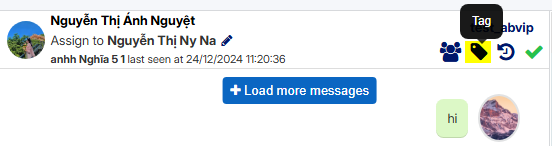
Bước 2: Click vào icon Tags
*(Step 2: Click on icon Tags)*
Bước 3: Chọn các Nhãn từ danh sách có sẵn
*(Step 3: Select the Tags from the available list)*
Nhãn sau khi được cập nhật thành công sẽ nằm ở danh sách các session -ngay dưới tên session
*(Tags, once successfully updated, will appear in the session list, right below the session name)*