> For the complete documentation index, see [llms.txt](https://docs.antbuddy.com/llms.txt). Markdown versions of documentation pages are available by appending `.md` to page URLs; this page is available as [Markdown](https://docs.antbuddy.com/tai-lieu-antbuddy-huong-dan-su-dung-antbuddy-docs-user-guide/huong-dan-su-dung-quan-tri-khach-hang-antcrm-antcrm-customer-management/chat-da-kenh-conversation/thao-tac-voi-khach-hang-tai-omni-working-with-customers-in-omni/huong-dan-su-dung-tinh-nang-chan-khach-hang-customer-blocking-feature-user.md).
# Hướng dẫn sử dụng tính năng chặn khách hàng (Customer blocking feature user )
### 1. Phạm vi áp dụng
### Scope
Tính năng **chỉ áp dụng cho kênh Facebook và Instagram**
This feature **applies only to Facebook and Instagram channels**.
### 2. Cách chặn khách hang
### How to Block a Customer
#### Bước 1: Mở đoạn Chat cần chặn
#### Step 1: Open the conversation
**·** Vào **Chat đa kênh**
Go to **Multi-channel Conversations**
· Chọn **session (đoạn Chat)** của khách hàng cần chặn
Select the **session (conversation)** of the customer you want to block
#### Bước 2: Thực hiện chặn
#### Step 2: Block the customer
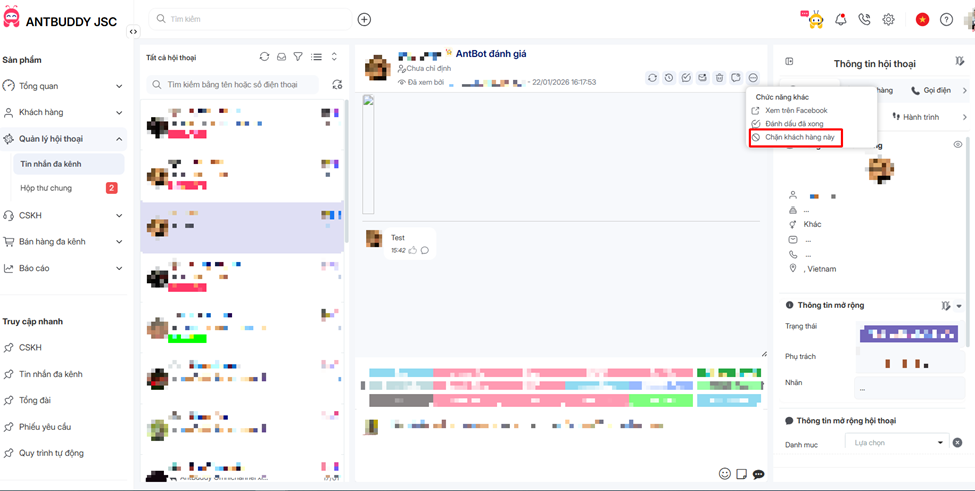
**1.** Trong session, chọn **More (⋯)**
In the session, click **More (⋯)**
**2.** Chọn **Chặn khách hàng này**
Select **Block this customer**
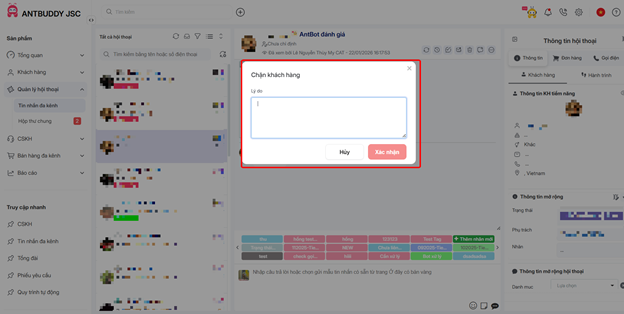
**3.** Nhập **lý do chặn**
Enter the **reason for blocking**
**4.** Nhấn **Xác nhận**
Click **Confirm**
👉 Sau khi xác nhận, khách hàng sẽ bị chặn trên kênh tương ứng (Facebook/Instagram).
After confirmation, the customer will be blocked on the corresponding channel (Facebook or Instagram).
### 3. Xem danh sách khách hàng bị chặn
### View the blocked customer list
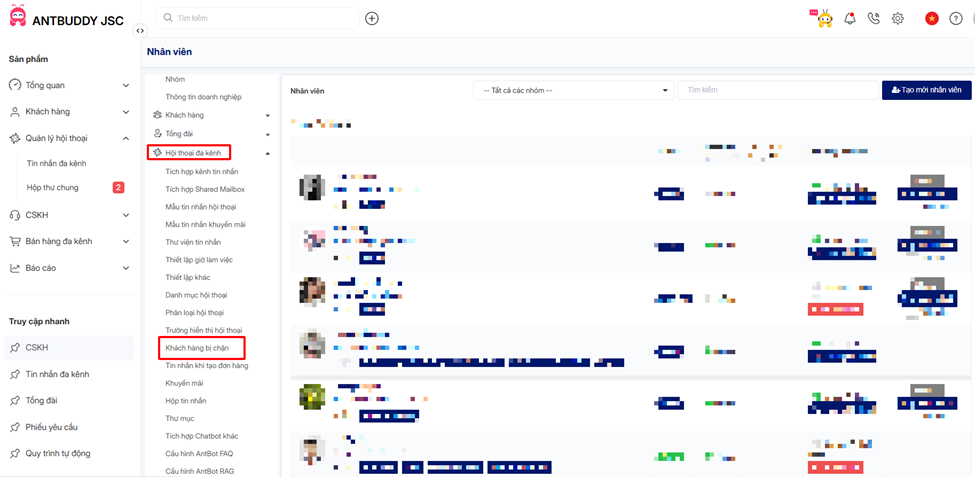
**1.** Vào **Chat đa kênh**
Go to **Multi-channel Conversations**
**2.** Chọn **Danh sách khách hàng bị chặn**
Open the **Blocked Customers list**
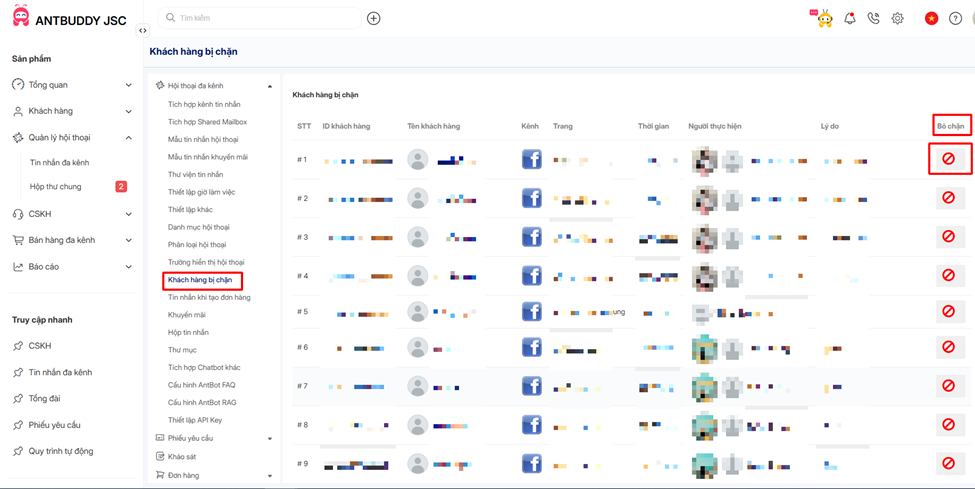
3\. Có thể xem:
o Thông tin khách hàng
o Lý do chặn
o Trạng thái chặn
You can view:
· Customer information
· Blocking reason
· Blocking status
### 4. Bỏ chặn khách hàng (nếu cần)
### Unblock a customer (if needed)
**·** Trong **danh sách khách hàng bị chặn**
In the **Blocked Customers list**
· Chọn khách hàng muốn thao tác
In the **Blocked Customers list**
**·** Thực hiện **Bỏ chặn**
Choose **Unblock**
👉 Sau khi bỏ chặn, khách hàng có thể tiếp tục nhắn tin bình thường.
After unblocking, the customer can continue messaging normally.
### 5. Lưu ý quan trọng
### Important Notes
· **Chỉ có Admin và Owner** mới có quyền:
**Only Admin and Owner roles** are allowed to:
o Chặn khách hang
Block customers
o Bỏ chặn khách hang
Unblock customers
**Member không có quyền thao tác** tính năng này
Member roles do not have permission to perform these actions.