> For the complete documentation index, see [llms.txt](https://docs.antbuddy.com/llms.txt). Markdown versions of documentation pages are available by appending `.md` to page URLs; this page is available as [Markdown](https://docs.antbuddy.com/tai-lieu-antbuddy-huong-dan-su-dung-antbuddy-docs-user-guide/huong-dan-su-dung-quan-tri-khach-hang-antcrm-antcrm-customer-management/chat-da-kenh-conversation/zalo-oa/14.-thiet-lap-danh-muc-chat-setting-up-omnichannel-chat-categories.md).
# 14. Thiết lập Danh mục Chat (Setting up Omnichannel chat Categories)
Tính năng này cho phép người dùng thiết lập danh mục chat
*(This feature allows user to set up Omnichannel chat Categories)*
Bước 1: Trên thanh menu trái, click **Thiết lập**
*(Step 1: On the left menu bar, click Settings.)*
Bước 2: Click nút **Chat đa kênh**
*(Step 2: Click the Omni-channel Conversations button.)*
Bước 3: Mở phần **danh mục chat**
*(Step 3: Open the Omnichannel chat Categories.)*

Bước 4: Chọn **thêm danh mục**
*(Select Add Category)*


Bước 5: Cập nhật tên danh mục
*(Update category name)*


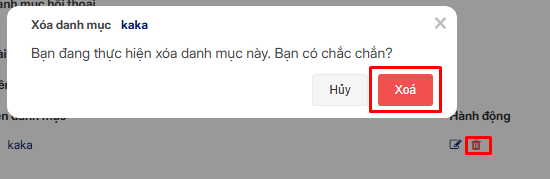
Bước 6: Xóa tên danh mục
*(Delete category name)*