> For the complete documentation index, see [llms.txt](https://docs.antbuddy.com/llms.txt). Markdown versions of documentation pages are available by appending `.md` to page URLs; this page is available as [Markdown](https://docs.antbuddy.com/tai-lieu-antbuddy-huong-dan-su-dung-antbuddy-docs-user-guide/huong-dan-su-dung-quan-tri-khach-hang-antcrm-antcrm-customer-management/chat-da-kenh-conversation/zalo-oa/7.-gui-hinh-anh-sending-images.md).
# 7. Gửi hình ảnh (Sending images)
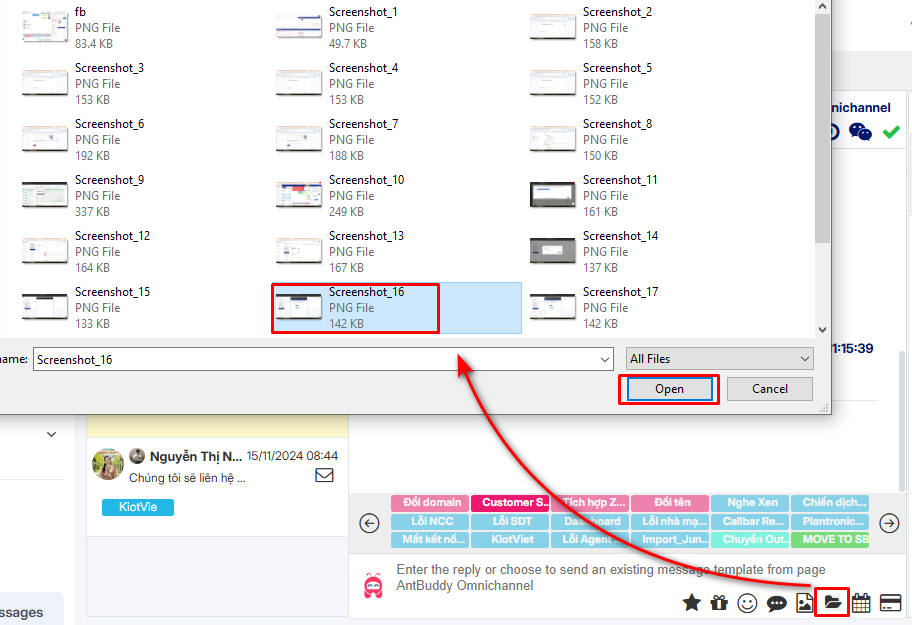
Bước 1. Tại thanh chat, click icon 
*(Step 1: In the chat bar, click the icon.)*


Bước 2. Chọn hình ảnh cần gửi
*(Step 2: Choose the picture to send)*
Bước 3. Click Open
*(Step 3: Click open)*

 Hình ảnh sẽ được gửi đi
*(The image will be sent.)*


Đây là ảnh nhận được từ khách hàng
*(This is the image received from the customer.)*
Để xem toàn bộ ảnh, click vào ảnh
*(To view the full image, click on the image.)*
Hình ảnh sẽ được gửi đi
*(The image will be sent.)*


Đây là ảnh nhận được từ khách hàng
*(This is the image received from the customer.)*
Để xem toàn bộ ảnh, click vào ảnh
*(To view the full image, click on the image.)*