# Chiến dịch Telesales là gì? Làm thế nào để chạy chiến dịch Telesales? (Telesales user manual)

**I. Chiến dịch telesales là gì?**\
**(What is a Telesales Campaign?)**

Telesales là phương pháp bán hàng qua điện thoại. Hình thức bán hàng này giúp điện\
thoại viên chủ động gọi ra cho khách hàng. Bằng cách sử dụng linh hoạt một kịch bản gọi\
ra có sẵn, các thông tin về sản phẩm dịch vụ của doanh nghiệp sẽ được trao đến khách\
hàng.

**(Telesales** is a sales method conducted over the phone, where sales representatives proactively call potential customers. By effectively using a predefined call script, businesses can deliver information about their products and services to customers.)

AntCRM Telesales là một module riêng của Phần mềm quản lý khách hàng AntCRM, bao\
gồm các tính năng:

(AntCRM Telesales is a dedicated module of the AntCRM customer management software, offering the following features:)<br>

1. **Telesales dành riêng cho nhân viên**\
   **(Telesales Features for Agent)**

* Gọi ra từ chiến dịch Telesales\
  (Outbound call telesales)
* Nhận chiến dịch và form chiến dịch\
  (Receive campaign and campaign forms.)
* Nhận danh sách khách hàng từ quản trị viên\
  (Access customer lists provided by administrator.)
* Click to call trực tiếp trên giao diện làm việc web\
  (Click-to-call directly from the web interface.)
* Ghi chú thông tin cuộc gọi ngay trực tiếp trên giao diện gọi\
  (Take call notes directly on the calling interface.)
* Xem báo cáo theo tình trạng cuộc gọi, theo tình trạng khách hàng\
  (View reports based on call status and customer status.)
* Tìm kiếm thông tin KH, tra cứu lịch sử cuộc gọi\
  (Search for customer information and check call history.)<br>

2. **Giám sát hệ thống call center telesales - dành cho quản trị viên**\
   **(Call Center Telesales Monitoring (For Administrators))**

* Bảng giám sát dashboard theo thời gian thực, báo cáo số lượng agent login, Số lượng agent không sẵn sàng và sẵn sàng, số cuộc gọi đang chờ, và tỷ lệ cuộc gọi không thành công.\
  (Number of logged-in agents, number of available and unavailable agents. Number of waiting calls and lost call rates.)
* Báo cáo xu hướng cuộc gọi theo theo giờ, ngày, tuần tháng\
  (Call trend reports by hour, day, week, and month.)
* Báo cáo thống kê theo chiến dịch\
  (Campaign performance reports)
* Xuất dữ liệu báo cáo dạng excel\
  (Export report data in Excel format.)
* Quản lý lịch sử giao dịch của khách hàng\
  (Manage customer order history.)
* Tạo kịch bản gọi ra cho từng chiến dịch telesales\
  (Create call scripts for each telesales campaign.)
* Phân bổ danh sách cho nhân viên telesales\
  (Assign customer lists to telesales agents.)
* Ghi âm cuộc gọi đến/đi, nghe ghi âm online, tải ghi âm\
  (Call recording for both inbound and outbound calls, with options to listen online or download recordings.)

**II. Làm thế nào để chạy chiến dịch Telesales?**\
**(How to Run a Telesales Campaign?)**

1. **Tạo chiến dịch**\
   **(Create a Campaign)**

Tại thanh menu, chọn mục **Chiến dịch** → **Telesales** → nhấn nút **Tạo chiến dịch**\
**(**&#x46;rom the menu bar, select **Campaign**→ **Telesales** → click the **Create Campaign** button.)

<figure><img src="https://2303854476-files.gitbook.io/~/files/v0/b/gitbook-x-prod.appspot.com/o/spaces%2FeTpJl0u63dzYBMNgXKfR%2Fuploads%2FZrM03uoIRX1IiskgtvAQ%2F1.jpg?alt=media&#x26;token=a6638849-3d9e-4b4f-b3a5-2845eef16094" alt=""><figcaption></figcaption></figure>

<figure><img src="https://2303854476-files.gitbook.io/~/files/v0/b/gitbook-x-prod.appspot.com/o/spaces%2FeTpJl0u63dzYBMNgXKfR%2Fuploads%2FsW8DorLYX77EN4WMxiRk%2Fe1.jpg?alt=media&#x26;token=43876dd8-eab0-45e5-8986-c2a7bbcda530" alt=""><figcaption></figcaption></figure>

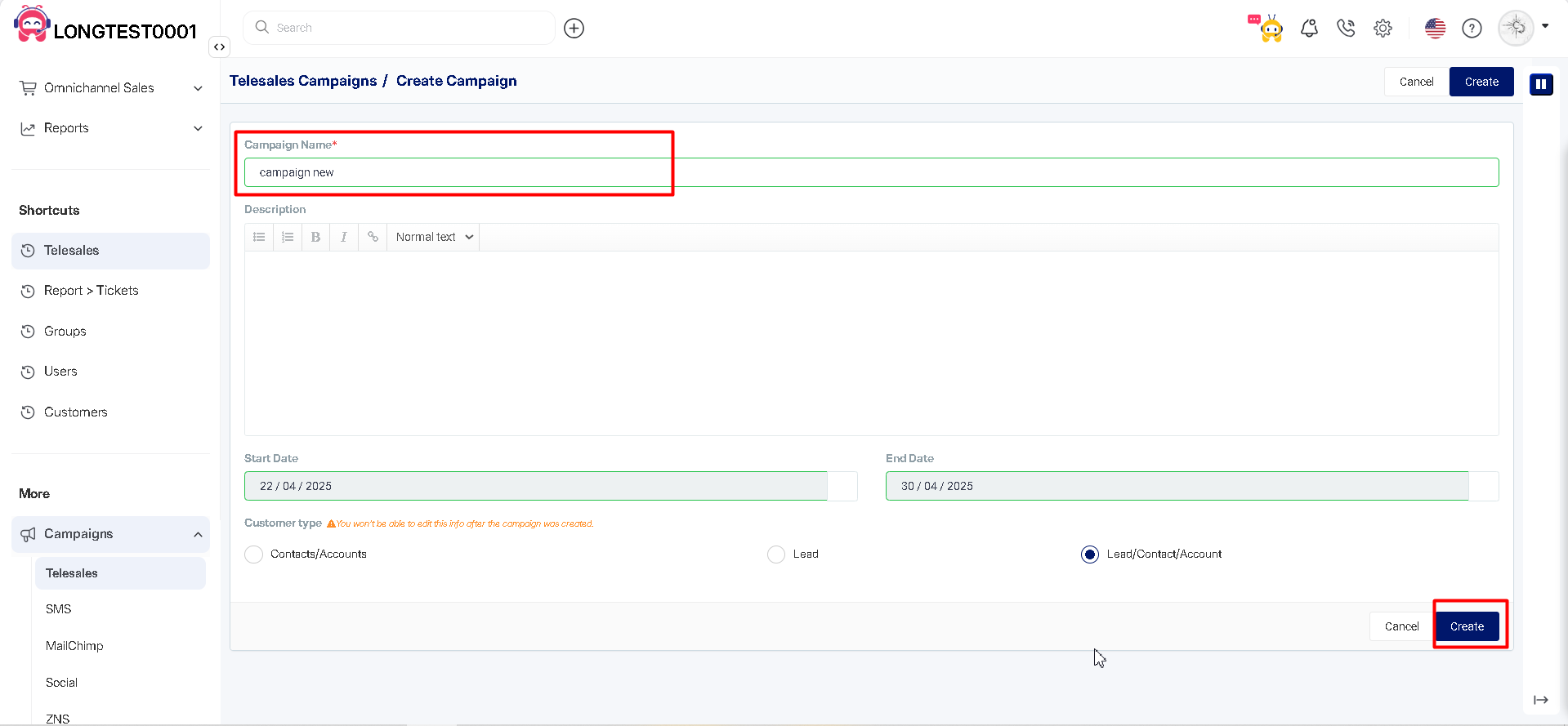
Tại giao diện tạo mới chiến dịch\
(On the New Campaign Creation Interface)

* Nhập tên chiến dịch (đây là trường bắt buộc)\
  (Enter the campaign name (required).
* Chọn ngày bắt đầu và kết thúc chiến dịch\
  (Select the start and end date of the campaign.)
* Chọn loại khách hàng (thông tin này không thể thay đổi sau khi chiến dịch được tạo)\
  (Choose the customer type (this information cannot be changed after the campaign is created).
* Nhấn nút **Tạo mới**\
  (Click the **Create** button.)

<figure><img src="https://2303854476-files.gitbook.io/~/files/v0/b/gitbook-x-prod.appspot.com/o/spaces%2FeTpJl0u63dzYBMNgXKfR%2Fuploads%2FDZ3rWGDzrhZ9IAFOGFUp%2Fimage.png?alt=media&#x26;token=36a5cdad-50c8-44ee-a9bb-6d3324ece7f2" alt=""><figcaption></figcaption></figure>

<figure><img src="https://2303854476-files.gitbook.io/~/files/v0/b/gitbook-x-prod.appspot.com/o/spaces%2FeTpJl0u63dzYBMNgXKfR%2Fuploads%2FGFFuChoBZc8MemrZ1MbX%2Fimage.png?alt=media&#x26;token=33295c64-442d-46cf-90d0-d4e829190e6d" alt=""><figcaption></figcaption></figure>

Sau khi tạo xong chiến dịch, trang sẽ chuyển đến trang **Thiết lập**\
**(**&#x41;fter creating the campaign, the page will navigate to the **Settings** page.)

<figure><img src="https://2303854476-files.gitbook.io/~/files/v0/b/gitbook-x-prod.appspot.com/o/spaces%2FeTpJl0u63dzYBMNgXKfR%2Fuploads%2Fk1DFvVqudOWBdui0D6gp%2Fimage.png?alt=media&#x26;token=4e1a7a4c-b72d-4360-9440-4d370f00c143" alt=""><figcaption></figcaption></figure>

<figure><img src="https://2303854476-files.gitbook.io/~/files/v0/b/gitbook-x-prod.appspot.com/o/spaces%2FeTpJl0u63dzYBMNgXKfR%2Fuploads%2Ftmc2joTrOMDVjWP5nmQW%2Fimage.png?alt=media&#x26;token=611667c7-536e-4037-8cc0-b2db159708c4" alt=""><figcaption></figcaption></figure>

**2. Thiết lập chiến dịch**\
**(Campaign Setup)**

Sau khi thực hiện xong việc tạo mới, giao diện thiết lập chiến dịch sẽ được hiển thị. Người\
dùng thực hiện thiết lập theo 4 bước sau:\
(After creating a new campaign, the **Campaign Setup** interface will be displayed. The user must complete the setup in the following four steps:)<br>

* Thêm nhân viên phụ trách (bắt buộc)\
  (Add responsible staff (mandatory)).
* Thêm khách hàng vào chiến dịch (bắt buộc)\
  (Add customers to the campaign (mandatory)).
* Phân phối khách hàng (bắt buộc)\
  (Distribute customers (mandatory)).
* Thiết lập trạng thái khách hàng\
  (Set up customer status.)
* Thiết lập Form khảo sát (bắt buộc)\
  (Configure the survey form (mandatory)).
* Thiết lập thông báo và email khi nhân viên được phân công khách hàng\
  (Set up notifications and emails when staff are assigned customers.)
* Thiết lập trường thông tin hiển thị cho popup\
  (Configure information fields displayed in the popup.)<br>

**2.1. Thêm nhân viên phụ trách**\
**(Add Responsible Staff)**

**Bước 1.** Chọn mục **Nhân viên phụ trách**\
**(Step 1:** Select the **Assignees**)

**Bước 2.** Nhấn **Thêm phụ trách**\
**(Step 2:** Click **Add Assignees**)

<figure><img src="https://2303854476-files.gitbook.io/~/files/v0/b/gitbook-x-prod.appspot.com/o/spaces%2FeTpJl0u63dzYBMNgXKfR%2Fuploads%2F3r7P1Igx9MJEHIors57z%2F2.jpg?alt=media&#x26;token=17848eaa-98a9-4657-91b4-d6a2cbc2b5fa" alt=""><figcaption></figcaption></figure>

<figure><img src="https://2303854476-files.gitbook.io/~/files/v0/b/gitbook-x-prod.appspot.com/o/spaces%2FeTpJl0u63dzYBMNgXKfR%2Fuploads%2FXQ9dftWL9e6wcLqcxanU%2Fe2.jpg?alt=media&#x26;token=8282b497-4d98-4d80-8593-083fd9938643" alt=""><figcaption></figcaption></figure>

**Bước 3**. Thực hiện chọn nhóm nhân viên, hoặc chọn từng nhân viên mà bạn muốn\
(**Step 3:** Select a Assignee group or choose individual Assignee members as needed.)

<figure><img src="https://2303854476-files.gitbook.io/~/files/v0/b/gitbook-x-prod.appspot.com/o/spaces%2FeTpJl0u63dzYBMNgXKfR%2Fuploads%2Fc4Ou3okiAymPNBsGhJCD%2F3.jpg?alt=media&#x26;token=fab20969-c54c-4719-9375-69e87c1e1c96" alt=""><figcaption></figcaption></figure>

<figure><img src="https://2303854476-files.gitbook.io/~/files/v0/b/gitbook-x-prod.appspot.com/o/spaces%2FeTpJl0u63dzYBMNgXKfR%2Fuploads%2F57VneBy9cZdvARbIBIo1%2Fe3.jpg?alt=media&#x26;token=0d74aea8-d67b-4d2d-8404-dfb8a7e949c6" alt=""><figcaption></figcaption></figure>

**Bước 4.** Chọn nút **Thêm** để thêm nhân viên\
(Step 4: Click the **Add** button to add Assignee.)

<figure><img src="https://2303854476-files.gitbook.io/~/files/v0/b/gitbook-x-prod.appspot.com/o/spaces%2FeTpJl0u63dzYBMNgXKfR%2Fuploads%2Fp7avzuNjS7CyIq6LREU0%2F2.jpg?alt=media&#x26;token=eeabb701-8eb1-41e9-9d4d-22aef29bb0f6" alt=""><figcaption></figcaption></figure>

<figure><img src="https://2303854476-files.gitbook.io/~/files/v0/b/gitbook-x-prod.appspot.com/o/spaces%2FeTpJl0u63dzYBMNgXKfR%2Fuploads%2FBqgXRjX0aRL0KWYythb8%2Fe2.jpg?alt=media&#x26;token=7aa39615-1fd6-4936-a56f-284f9547df3f" alt=""><figcaption></figcaption></figure>

Sau khi thêm nhân viên, tại mục **Nhân viên phụ trách** sẽ hiển thị nhân viên đã được thêm\
(After adding Assignee , the Assignee section will display the added Assignee.)

<figure><img src="https://2303854476-files.gitbook.io/~/files/v0/b/gitbook-x-prod.appspot.com/o/spaces%2FeTpJl0u63dzYBMNgXKfR%2Fuploads%2FpoMKoWp6bPXiBpRjmFKB%2F3.jpg?alt=media&#x26;token=77c6c5ce-2e36-409d-bd2b-cdc1b148fcd8" alt=""><figcaption></figcaption></figure>

<figure><img src="https://2303854476-files.gitbook.io/~/files/v0/b/gitbook-x-prod.appspot.com/o/spaces%2FeTpJl0u63dzYBMNgXKfR%2Fuploads%2FwXSGdosunDXZTxfhtOh2%2Fe3.jpg?alt=media&#x26;token=d043d038-4e45-49c7-84ef-99c554a16f88" alt=""><figcaption></figcaption></figure>

**2.2. Thêm khách hàng tham gia**\
**(Add Customers to the Campaign)**

Cần lưu ý rằng loại khách hàng được thêm vào chiến dịch sẽ phụ thuộc vào loại khách hàng mà bạn đã chọn lúc tạo chiến dịch Telesales. \
(Please note that the type of customers added to the campaign will depend on the customer type selected when creating the Telesales Campaig&#x6E;**:**)

* Nếu tạo chiến dịch cho loại khách hàng Leads, bạn chỉ có thể thêm Leads vào chiến dịch\
  (If the campaign is created for Leads, only Leads can be added.)
* Nếu tạo chiến dịch cho loại Contacts/Accounts, bạn chỉ có thể thêm Contacts/Accounts vào chiến dịch\
  (If the campaign is created for Contacts/Accounts, only Contacts/Accounts can be added.)
* Nếu tạo chiến dịch cho loại Leads/Contacts/Accounts, bạn có thể thêm cả 3 loại khách hàng vào chiến dịch.\
  (If the campaign is created for Leads/Contacts/Accounts, all three customer types can be added.)

**Bước 1.** Chọn mục **Khách hàng tham gia**\
**(Step 1**: Select the **Customers** .)

**Bước 2.** Chọn **Thêm khách hàng**\
**(Step 2**: Click **Add Leads/Contacts/Accounts**.)

<figure><img src="https://2303854476-files.gitbook.io/~/files/v0/b/gitbook-x-prod.appspot.com/o/spaces%2FeTpJl0u63dzYBMNgXKfR%2Fuploads%2FdAkKw6cH8wCuNK38JFsD%2F4.jpg?alt=media&#x26;token=f1eba937-c0a5-47bb-99cd-19c86e1e56a5" alt=""><figcaption></figcaption></figure>

<figure><img src="https://2303854476-files.gitbook.io/~/files/v0/b/gitbook-x-prod.appspot.com/o/spaces%2FeTpJl0u63dzYBMNgXKfR%2Fuploads%2F68xwLo75UNAyTQzOsD0l%2Fe4.jpg?alt=media&#x26;token=2670b2b0-6bfc-4066-9edc-cb72063d8aed" alt=""><figcaption></figcaption></figure>

**Bước 3.**  Tại Danh sách dữ liệu khách hàng\
(**Step 3:** In the Customer List)

* Thực hiện chọn khách hàng → chọn nút **Thêm** để thêm khách hàng\
  (Select the customers → Click the **Add** button to add them.)

<figure><img src="https://2303854476-files.gitbook.io/~/files/v0/b/gitbook-x-prod.appspot.com/o/spaces%2FeTpJl0u63dzYBMNgXKfR%2Fuploads%2FOLD1wDV70c8bWSzZKCN8%2Fimage.png?alt=media&#x26;token=9d37176e-c3b5-4314-ae23-de6fbcc20d6e" alt=""><figcaption></figcaption></figure>

<figure><img src="https://2303854476-files.gitbook.io/~/files/v0/b/gitbook-x-prod.appspot.com/o/spaces%2FeTpJl0u63dzYBMNgXKfR%2Fuploads%2F3sBG6uV53PB4a1YkVomH%2Fimage.png?alt=media&#x26;token=63b1da90-6315-4d7e-88bc-35700d099167" alt=""><figcaption></figcaption></figure>

Hoặc thực hiện lọc những khách hàng mong muốn và nhấn nút **Thêm tất cả khách hàng** tìm thấy\
(Or, apply filters (see filtering guide) to find specific customers and click Add All Found Customers.)

<figure><img src="https://2303854476-files.gitbook.io/~/files/v0/b/gitbook-x-prod.appspot.com/o/spaces%2FeTpJl0u63dzYBMNgXKfR%2Fuploads%2FqNhehXTvX86vXN660cJS%2Fimage.png?alt=media&#x26;token=400aa360-ec71-47f7-a9a3-48f48b295d07" alt=""><figcaption></figcaption></figure>

<figure><img src="https://2303854476-files.gitbook.io/~/files/v0/b/gitbook-x-prod.appspot.com/o/spaces%2FeTpJl0u63dzYBMNgXKfR%2Fuploads%2F6CgEi2Wd7i0kOh3EccDk%2Fimage.png?alt=media&#x26;token=58d85650-2bd7-4d07-9fc2-0f481f4132ec" alt=""><figcaption></figcaption></figure>

**Sử dụng bộ lọc để tìm kiếm và thêm khách hàng vào chiến dịch:**\
**(**&#x55;se filters to search for and add customers to a campaign:)

AntCRM hỗ trợ nhiều bộ lọc để quản trị viên có thể lọc ra chính xác danh sách khách hàng cần thêm vào chiến dịch, cụ thể có các bộ lọc đầy đủ như LEAD / CONTACT / ACCCOUNT như sau: \
(AntCRM provides multiple filters, allowing administrators to precisely filter the list of customers to be added to a campaign. The available filters for LEAD / CONTACT / ACCOUNT include:)

* Ngày tạo khách hàng\
  (Customer creation date)
* Ngày chăm sóc cuối cùng\
  (Last date care)
* Mã khách hàng (từ ID … đến ID…)\
  (Customer ID (from ID … to ID …))
* Trạng thái khách hàng\
  (Status)
* Ngành nghề khách hàng\
  (Industry)
* Nguồn khách hàng\
  (Customer source)
* Giới tính\
  (Gender)
* Độ tuổi \
  (Age)
* Ngày sinh\
  (Date of birth)
* Nhãn\
  (Tags)\
  ...

Bên cạnh đó, bạn có thể sử dụng bộ lọc nâng cao đã tạo ở trang danh sách khách hàng để lọc khách hàng và thêm vào chiến dịch. \
(Additionally, you can use advanced filters created on the customer list page to filter customers and add them to a campaign.)

Cách tạo bộ lọc nâng cao vui lòng xem phần 5 của[ bài hướng dẫn lọc khách hàng](https://docs.google.com/document/d/1eVXTMUuACDDWGLI4HTHe7BXIyhFk56bCQU2NQJ-ARjA/edit#heading=h.m232nnbjq6wq).\
(For instructions on creating advanced filters, please refer to Section 5 of the customer filtering guide.)

Tạo bộ lọc tại trang Khách hàng\
(Create filter at Customer page)&#x20;

<figure><img src="https://2303854476-files.gitbook.io/~/files/v0/b/gitbook-x-prod.appspot.com/o/spaces%2FeTpJl0u63dzYBMNgXKfR%2Fuploads%2FQXof5uyf3i6FlD2X1GVy%2Fe8.jpg?alt=media&#x26;token=5a7d8d9f-7cea-46ee-bb3d-05d9a936deb1" alt=""><figcaption></figcaption></figure>

<figure><img src="https://2303854476-files.gitbook.io/~/files/v0/b/gitbook-x-prod.appspot.com/o/spaces%2FeTpJl0u63dzYBMNgXKfR%2Fuploads%2FynBb8Rwqml04csHe6Qb9%2Fimage.png?alt=media&#x26;token=43da294c-48ee-4b08-aca7-05dea0615ace" alt=""><figcaption></figcaption></figure>

Sử dụng tại trang Chiến dịch Telesale\
(Use at Telesales Campaign setting page)

<figure><img src="https://2303854476-files.gitbook.io/~/files/v0/b/gitbook-x-prod.appspot.com/o/spaces%2FeTpJl0u63dzYBMNgXKfR%2Fuploads%2FC0DWVHfj1TZuf2nmFMf8%2Fimage.png?alt=media&#x26;token=392f3893-bd5e-47e5-87c7-750dd4d18f51" alt=""><figcaption></figcaption></figure>

<figure><img src="https://2303854476-files.gitbook.io/~/files/v0/b/gitbook-x-prod.appspot.com/o/spaces%2FeTpJl0u63dzYBMNgXKfR%2Fuploads%2FSAudsoGKq4B6HyyT8CFA%2Fimage.png?alt=media&#x26;token=a78a4dd2-95f9-475c-8184-c28e840feb0d" alt=""><figcaption></figcaption></figure>

**Bước 4.** Khi thêm khách hàng, popup thông báo hiện lên:\
(**Step 4**. When adding a customer, a notification popup appears:)

<figure><img src="https://2303854476-files.gitbook.io/~/files/v0/b/gitbook-x-prod.appspot.com/o/spaces%2FeTpJl0u63dzYBMNgXKfR%2Fuploads%2FwbgAEuJiAN8Iq7AweUGo%2Fimage.png?alt=media&#x26;token=8031e95f-9170-48b9-9127-f913ba1d9728" alt=""><figcaption></figcaption></figure>

<figure><img src="https://2303854476-files.gitbook.io/~/files/v0/b/gitbook-x-prod.appspot.com/o/spaces%2FeTpJl0u63dzYBMNgXKfR%2Fuploads%2FNGmgI4wTC3E5HWaV6q5U%2Fimage.png?alt=media&#x26;token=1905a672-290b-4581-9255-dfe5aaf780fa" alt=""><figcaption></figcaption></figure>

Nhấn nút **Tiếp tục** → popup đóng, bạn có thể tiếp tục chọn và thêm khách hàng vào chiến dịch.\
(Click **Continue** → The popup closes, allowing you to continue selecting and adding customers to the campaign.)

Nhấn nút **Phân phối** → trang sẽ chuyển đến xem Danh sách khách hàng đã thêm vào chiến dịch\
(Click **Distribute** → The page redirects to view the list of customers already added to the campaign.)

Để tiếp tục thêm khách hàng vào chiến dịch, nhấn nút **Thêm khách hàng**\
**(**&#x54;o continue adding customers to the campaign, click **Add Customer.**)

<figure><img src="https://2303854476-files.gitbook.io/~/files/v0/b/gitbook-x-prod.appspot.com/o/spaces%2FeTpJl0u63dzYBMNgXKfR%2Fuploads%2FiXGG3lb6vWp5qGH5OFJm%2Fimage.png?alt=media&#x26;token=87138b01-95fd-4c5e-8bfa-c7bab243082d" alt=""><figcaption></figcaption></figure>

<figure><img src="https://2303854476-files.gitbook.io/~/files/v0/b/gitbook-x-prod.appspot.com/o/spaces%2FeTpJl0u63dzYBMNgXKfR%2Fuploads%2F2sEwmHJYzFJHdLTAnCC2%2Fimage.png?alt=media&#x26;token=bd9636f6-1990-4a39-9e3d-99465a3b371e" alt=""><figcaption></figcaption></figure>

Để xóa khách hàng khỏi danh sách, thực hiện chọn và nhấn nút **Xóa**\
**(**&#x54;o remove a customer from the list, select and press the **Remove** button.)

<figure><img src="https://2303854476-files.gitbook.io/~/files/v0/b/gitbook-x-prod.appspot.com/o/spaces%2FeTpJl0u63dzYBMNgXKfR%2Fuploads%2FKyUSghQwKW5MNctLVXun%2Fimage.png?alt=media&#x26;token=a874d48b-9ae6-4b50-adfd-da6aa99f6935" alt=""><figcaption></figcaption></figure>

<figure><img src="https://2303854476-files.gitbook.io/~/files/v0/b/gitbook-x-prod.appspot.com/o/spaces%2FeTpJl0u63dzYBMNgXKfR%2Fuploads%2FsD1VZpmBpLdSr69n4VOy%2Fimage.png?alt=media&#x26;token=1faea4c7-1483-4ce2-9fc7-3c08b890e2c4" alt=""><figcaption></figcaption></figure>

2.3. Phân phối khách hàng cho nhân viên Telesales đảm nhận\
(Assigning Customers to Telesales Agent)

Sau khi thêm khách hàng vào chiến dịch, quản trị viên cần phải phân công khách hàng cho nhân viên Telesales để phụ trách và thực hiện tương tác. \
(After adding customers to a campaign, the administrator must assign them to Telesales staff for management and interaction.)

AntCRM hỗ trợ 2 cách phân phối: \
(AntCRM supports two distribution methods:)

* Phân phối thủ công\
  (Manual assignment)
* Phân phối tự động\
  (Automatic assignment)

**Hướng dẫn cụ thể như sau:** \
**(Specific instruction**s: )

**Phân phối thủ công**\
**(Manual assignment)**

* **Bước 1.** Tại trang danh sách khách hàng của Chiến dịch Telesales, thực hiện chọn khách hàng\
  (**Step 1:** On the Telesales Campaign customer list page, select the customers.)
* **Bước 2.** Nhấn nút **Phân phối**\
  **(Step 2:** Click the **Assign** button.)

<figure><img src="https://2303854476-files.gitbook.io/~/files/v0/b/gitbook-x-prod.appspot.com/o/spaces%2FeTpJl0u63dzYBMNgXKfR%2Fuploads%2FVzNrbZKIseUJQSgMgt43%2Fimage.png?alt=media&#x26;token=92ae83ab-797a-482d-979e-91cb7b9a486e" alt=""><figcaption></figcaption></figure>

<figure><img src="https://2303854476-files.gitbook.io/~/files/v0/b/gitbook-x-prod.appspot.com/o/spaces%2FeTpJl0u63dzYBMNgXKfR%2Fuploads%2Foj4UjqkIfeJUVQBjzxgj%2Fimage.png?alt=media&#x26;token=deba9524-e168-4d70-9fb7-81e2a6e13e95" alt=""><figcaption></figcaption></figure>

* **Bước 3.** Chọn **nhân viên.**\
  **(Step 3:** Chose assignee)

<figure><img src="https://2303854476-files.gitbook.io/~/files/v0/b/gitbook-x-prod.appspot.com/o/spaces%2FeTpJl0u63dzYBMNgXKfR%2Fuploads%2Ffrk4H5F69zhbiUyPXZww%2F5.jpg?alt=media&#x26;token=598bf5e3-cf62-4f33-b295-4fc8032f54c9" alt=""><figcaption></figcaption></figure>

<figure><img src="https://2303854476-files.gitbook.io/~/files/v0/b/gitbook-x-prod.appspot.com/o/spaces%2FeTpJl0u63dzYBMNgXKfR%2Fuploads%2FezukVc8YSzvEfCGdgKUT%2Fe5.jpg?alt=media&#x26;token=ad8ebbc0-b24f-4ae8-88f5-e23c693e1f84" alt=""><figcaption></figcaption></figure>

Tại bước này có thêm lựa chọn nâng cao là "Đồng bộ thông tin người phụ trách của khách hàng":\
(At this step, there is an additional advanced option: "Sync responsible staff of customer")\
&#x20;Tính năng này cho phép thay đổi người phụ trách của khách hàng ở lead/contact/account theo người phụ trách trong chiến dịch\
(This feature allows updating the customer owner in leads/contacts/accounts to match the assigned staff in the campaign.)

* **Bước 4:** Nhấn **Tiếp tục**\
  **(Step 4:** Click **Continue**.)

**Phân phối tự động:**\
**(Automatic assignment)**

Chỉ cần 2 thao tác đơn giản, bạn có thể phân công toàn bộ số lượng lớn khách hàng đồng đều cho các nhân viên. \
(With just 2 simple steps, you can evenly distribute a large number of customers among the staff.)

**Bước 1.** Tại trang danh sách khách hàng của Chiến dịch Telesales, nhấn nút **Phân phối tự động**\
(**Step 1:** On the Telesales Campaign customer list page, click the Automatic Assignment button.)

**Bước 2.** Chọn cơ chế phân phối tự động và nhấn **Tiếp Tục**\
(**Step 2:** Select the automatic assignment mechanism and click Continue.)

<figure><img src="https://2303854476-files.gitbook.io/~/files/v0/b/gitbook-x-prod.appspot.com/o/spaces%2FeTpJl0u63dzYBMNgXKfR%2Fuploads%2FjEcaxG7LmWA53n9do8Jn%2F6.jpg?alt=media&#x26;token=5d4a1736-a0b7-44a5-8de1-f9ebd6db6a14" alt=""><figcaption></figcaption></figure>

<figure><img src="https://2303854476-files.gitbook.io/~/files/v0/b/gitbook-x-prod.appspot.com/o/spaces%2FeTpJl0u63dzYBMNgXKfR%2Fuploads%2FLFFeYncJWc2lfs6Yfllk%2Fe6.jpg?alt=media&#x26;token=94ae8031-599a-4b0b-b8f0-311d43d4858e" alt=""><figcaption></figcaption></figure>

Có 2 cơ chế phân phối tự động là:\
(Two automatic assignment mechanisms:)

* Phân phối các khách hàng chưa được phân phối\
  (Only apply for the account/contact/lead that hasn't been assigned)
* Phân phối tất cả khách hàng có trong chiến dịch (dù đã phân công hay chưa)\
  (Apply for all Leads/Contacts/Accounts)

Có 2 lựa chọn nâng cao:\
(Two advanced options:)

* **Đồng bộ thông tin người phụ trách của khách hàng:** Thay đổi người phụ trách của khách hàng ở lead/contact/account theo người phụ trách trong chiến dịch\
  (**Synchronize responsible staff of customer:** Update the customer owner in leads/contacts/accounts to match the assigned staff in the campaign.)
* **Ưu tiên phân phối theo người phụ trách của khách hàng:** Phân phối người phụ trách của khách hàng trong chiến dịch theo người phụ trách ở lead/contact/account \
  (**Priority of distribution responsible staff of customer:** Assign customers in the campaign according to their existing owner in leads/contacts/accounts.)

<figure><img src="https://2303854476-files.gitbook.io/~/files/v0/b/gitbook-x-prod.appspot.com/o/spaces%2FeTpJl0u63dzYBMNgXKfR%2Fuploads%2FXPOSYVkSBgzyfCqRedtr%2Fimage.png?alt=media&#x26;token=25a6feb9-14b5-4ed0-825e-6091eb29d966" alt=""><figcaption></figcaption></figure>

<figure><img src="https://2303854476-files.gitbook.io/~/files/v0/b/gitbook-x-prod.appspot.com/o/spaces%2FeTpJl0u63dzYBMNgXKfR%2Fuploads%2F8w0moS3NDv9xOjodv4Mq%2Fimage.png?alt=media&#x26;token=aa40e72e-620f-449b-995d-0f4a8ada360d" alt=""><figcaption></figcaption></figure>

Giao diện sau khi phân phối thành công\
(Interface after successful deployment)

<figure><img src="https://2303854476-files.gitbook.io/~/files/v0/b/gitbook-x-prod.appspot.com/o/spaces%2FeTpJl0u63dzYBMNgXKfR%2Fuploads%2FSyBlWI7gGi3m4OcFzkBq%2Fimage.png?alt=media&#x26;token=1aca1dae-9d80-40aa-8e9f-74445a234fc2" alt=""><figcaption></figcaption></figure>

<figure><img src="https://2303854476-files.gitbook.io/~/files/v0/b/gitbook-x-prod.appspot.com/o/spaces%2FeTpJl0u63dzYBMNgXKfR%2Fuploads%2FoOqGSYMUQVoHuWv7D5Uh%2Fimage.png?alt=media&#x26;token=502965ea-2cca-4acd-8b7f-223ea2e973e6" alt=""><figcaption></figcaption></figure>

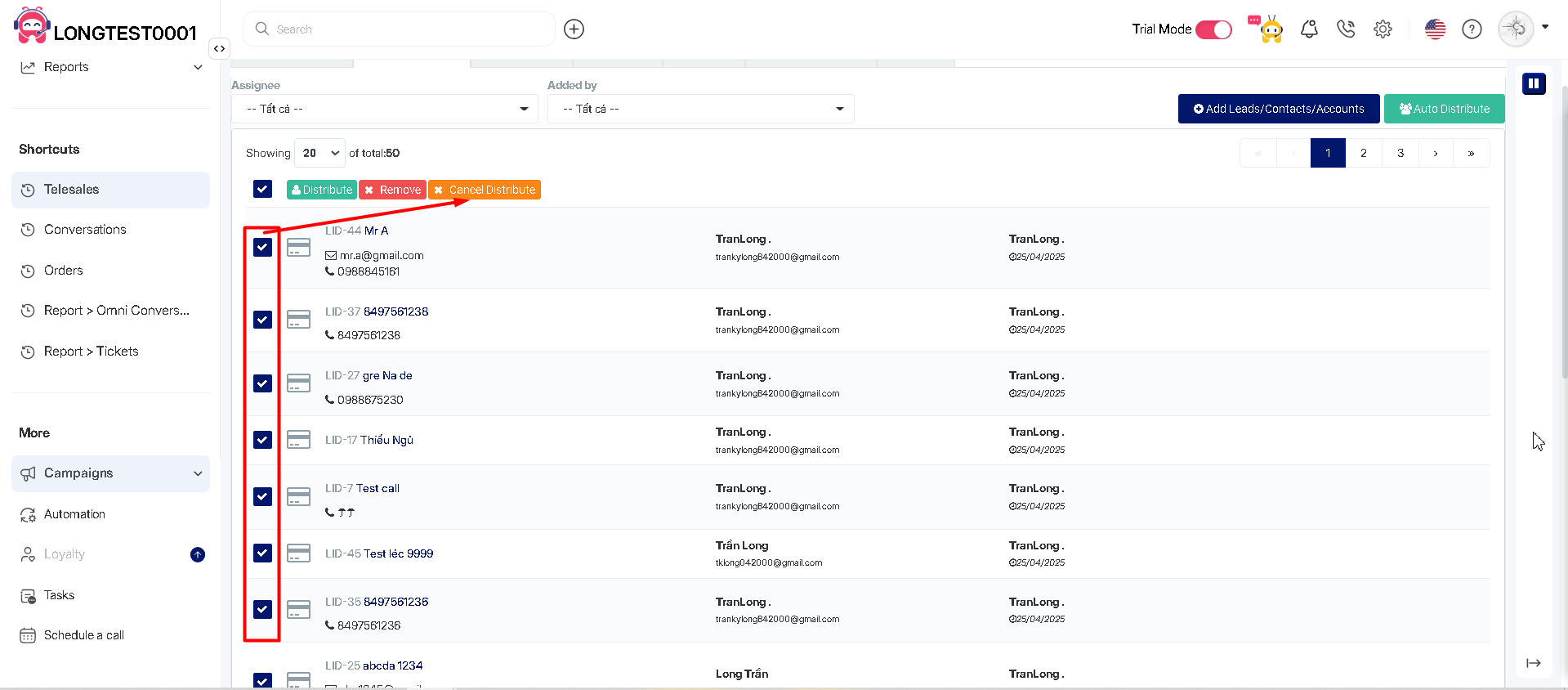
Để gỡ nhân viên phụ trách khách hàng trong chiến dịch, tick chọn một hoặc danh sách khách hàng cần gỡ rồi chọn nút **Gỡ phân phối**\
(To remove the assigned distributor, tick one or multiple customers from the list, then click the **Cancel Distribution** button.)

<figure><img src="https://2303854476-files.gitbook.io/~/files/v0/b/gitbook-x-prod.appspot.com/o/spaces%2FeTpJl0u63dzYBMNgXKfR%2Fuploads%2Fneh0uj1kcf2lwQoRVNSw%2Fimage.png?alt=media&#x26;token=c417cc86-5514-426d-9e4b-4d81af331289" alt=""><figcaption></figcaption></figure>

<figure><img src="https://2303854476-files.gitbook.io/~/files/v0/b/gitbook-x-prod.appspot.com/o/spaces%2FeTpJl0u63dzYBMNgXKfR%2Fuploads%2FCnRvbQ8XiAx9dqTdIc1A%2Fimage.png?alt=media&#x26;token=b629ab79-bb8e-4bde-8b31-dae936328d7a" alt=""><figcaption></figcaption></figure>

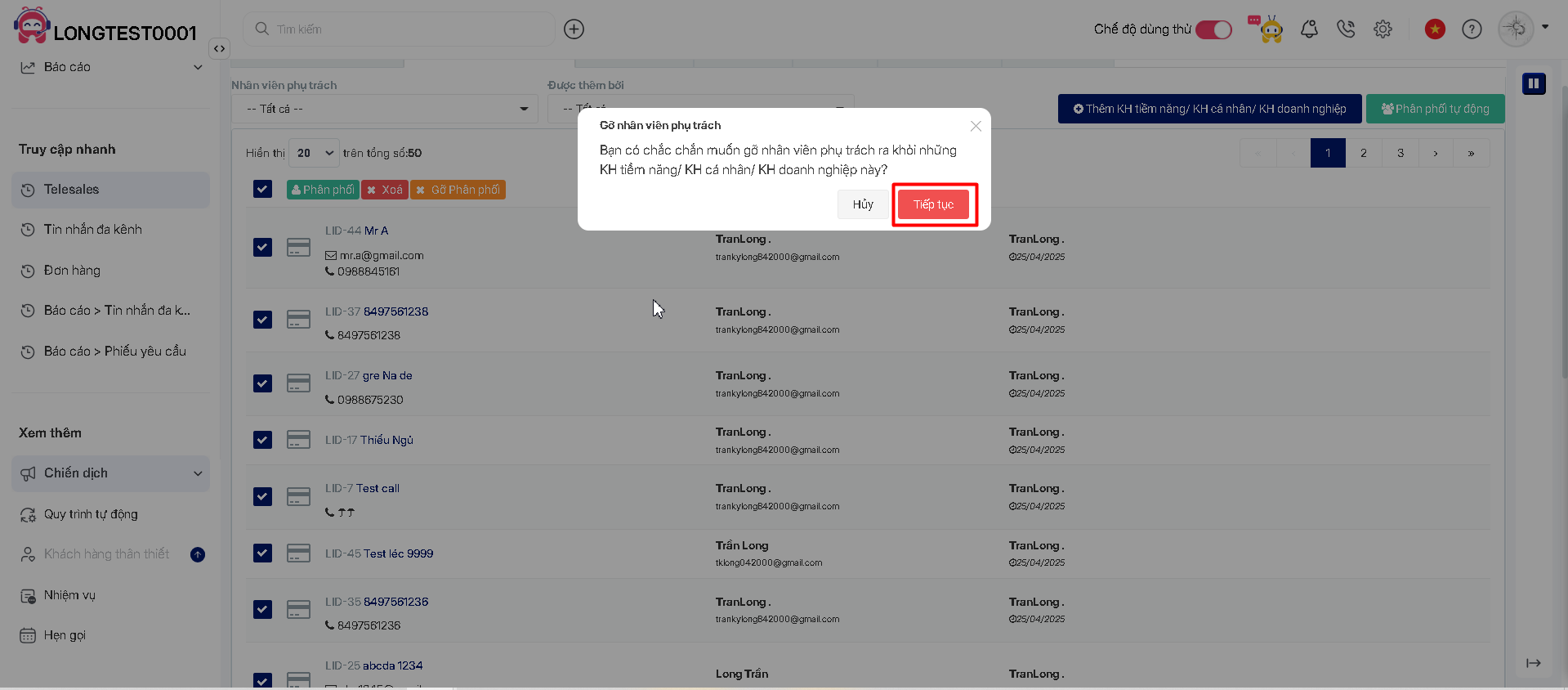
Nhấn **Tiếp tục** để hoàn tất thao tác Gỡ nhân viên phụ trách.\
(Click **Continue** to complete the removal process.)

<figure><img src="https://2303854476-files.gitbook.io/~/files/v0/b/gitbook-x-prod.appspot.com/o/spaces%2FeTpJl0u63dzYBMNgXKfR%2Fuploads%2FYTsRWuSrQlDP9l3euWmV%2Fimage.png?alt=media&#x26;token=f551cb99-5aaa-4eae-9ee9-7f03a85e1bb9" alt=""><figcaption></figcaption></figure>

<figure><img src="https://2303854476-files.gitbook.io/~/files/v0/b/gitbook-x-prod.appspot.com/o/spaces%2FeTpJl0u63dzYBMNgXKfR%2Fuploads%2FoBVlvphVtBvSpJruYbB2%2Fimage.png?alt=media&#x26;token=3338b4a2-2097-496e-92bc-01cabba47990" alt=""><figcaption></figcaption></figure>

**2.4. Thiết lập trạng thái khách hàng trong Chiến dịch Telesales**\
**(Setting Customer Status in a Telesales Campaign)**

Đối với chiến dịch có loại khách hàng là Leads, bạn có 2 tùy chọn như sau: \
(For campaigns with customer is Leads, you have two options:)

* **Sử dụng danh sách trạng thái Leads đã có:** Sử dụng danh sách trạng thái của Leads đã thiết lập sẵn tại trang **Thiết lập → Leads → Trạng thái Leads**, các Leads được thêm vào chiến dịch sẽ giữ nguyên trạng thái.\
  (**Use existed Leads status list:** Use the pre-configured Leads status list from **Settings → Leads → Leads Stages.** Any Leads added to the campaign will retain their current status.
* **Tạo danh sách trạng thái riêng:** Tạo mới danh sách trạng thái riêng, danh sách trạng thái này chỉ khả dụng cho riêng chiến dịch hiện tại, các Leads được thêm vào chiến dịch sẽ có Trạng thái mặc định\
  **Create new status list:** Create a new status list that is exclusive to the current campaign. Leads added to the campaign will have a default status from this list.

<figure><img src="https://2303854476-files.gitbook.io/~/files/v0/b/gitbook-x-prod.appspot.com/o/spaces%2FeTpJl0u63dzYBMNgXKfR%2Fuploads%2FmuPCXw5CM4IHD8cEckDD%2Fanh20.png?alt=media&#x26;token=f08040d2-eaf5-47d1-b69c-8205be81607a" alt=""><figcaption></figcaption></figure>

<figure><img src="https://2303854476-files.gitbook.io/~/files/v0/b/gitbook-x-prod.appspot.com/o/spaces%2FeTpJl0u63dzYBMNgXKfR%2Fuploads%2FuOA5NcdUKGaSSg0uTcxc%2Fe32.jpg?alt=media&#x26;token=2adff6f5-5c81-4139-ac1f-8e5e935e604c" alt=""><figcaption></figcaption></figure>

Đối với chiến dịch có loại khách hàng là Contacts/Accounts, bạn có 2 tùy chọn như sau: \
(For campaigns with customer types set as Contacts/Accounts, you have two options:)

* **Sử dụng danh sách trạng thái Contacts/Accounts đã có:** Sử dụng danh sách trạng thái của Leads đã thiết lập sẵn tại trang **Thiết lập → Contact/Account→ Trạng thái Contact/Account**, các Contact/Account được thêm vào chiến dịch sẽ giữ nguyên trạng thái.\
  (**Use existed Contact/Account status list**: This option utilizes the pre-configured status list from **Settings → Contact/Account → Contact/Account Stages** . Any Contact/Account added to the campaign will retain their current status.)
* **Tạo danh sách trạng thái riêng:** Tạo mới danh sách trạng thái riêng, danh sách trạng thái này chỉ khả dụng cho riêng chiến dịch hiện tại, các Contact/Account được thêm vào chiến dịch sẽ có Trạng thái mặc định\
  (**Create new status list:** This option allows you to create a new status list that is exclusive to the current campaign. Any Contact/Account added to the campaign will have a default status from this list.)

<figure><img src="https://2303854476-files.gitbook.io/~/files/v0/b/gitbook-x-prod.appspot.com/o/spaces%2FeTpJl0u63dzYBMNgXKfR%2Fuploads%2FnSN7eG1Zc18S93oXyNTg%2Fanh21.png?alt=media&#x26;token=eb0e7b39-505e-4ae5-ad54-ed40294eefc4" alt=""><figcaption></figcaption></figure>

<figure><img src="https://2303854476-files.gitbook.io/~/files/v0/b/gitbook-x-prod.appspot.com/o/spaces%2FeTpJl0u63dzYBMNgXKfR%2Fuploads%2FuFJ2qz6JQIuQV5LHZSGk%2Fe33.jpg?alt=media&#x26;token=b9ed9b4a-9368-41f2-84bc-70f62e61a562" alt=""><figcaption></figcaption></figure>

Đối với chiến dịch có loại khách hàng là Leads/Contacts/Accounts, bạn chỉ có 1 tùy chọn:\
(For campaigns with customer types set as Leads/Contacts/Accounts, you have only one option:)

* **Tạo danh sách trạng thái riêng:** Tạo mới danh sách trạng thái riêng, danh sách trạng thái này chỉ khả dụng cho riêng chiến dịch hiện tại, các Lead/Contact/Account được thêm vào chiến dịch sẽ có Trạng thái mặc định \
  (**Create custom status list:** This option allows you to create a new status list that is exclusive to the current campaign. Any Lead/Contact/Account added to the campaign will have a default status from this list.

<figure><img src="https://2303854476-files.gitbook.io/~/files/v0/b/gitbook-x-prod.appspot.com/o/spaces%2FeTpJl0u63dzYBMNgXKfR%2Fuploads%2F0fPEXSWoYlDlzrrOVLJp%2Fanh22.png?alt=media&#x26;token=ac53bc65-909b-43d7-935a-f14af8288c1e" alt=""><figcaption></figcaption></figure>

<figure><img src="https://2303854476-files.gitbook.io/~/files/v0/b/gitbook-x-prod.appspot.com/o/spaces%2FeTpJl0u63dzYBMNgXKfR%2Fuploads%2FIhCZmv7cgw87ub4vqPVw%2Fanh23.png?alt=media&#x26;token=028d58be-1fc0-443a-a2fa-c7bf47191855" alt=""><figcaption></figcaption></figure>

<figure><img src="https://2303854476-files.gitbook.io/~/files/v0/b/gitbook-x-prod.appspot.com/o/spaces%2FeTpJl0u63dzYBMNgXKfR%2Fuploads%2Flm0lwlZ5BT61Wkg6FeXo%2Fe34.jpg?alt=media&#x26;token=41b0cf41-60b5-4810-b85a-7772e1938adc" alt=""><figcaption></figcaption></figure>

<figure><img src="https://2303854476-files.gitbook.io/~/files/v0/b/gitbook-x-prod.appspot.com/o/spaces%2FeTpJl0u63dzYBMNgXKfR%2Fuploads%2Fdh7JkzL1nvA801a7TDZ6%2Fimage.png?alt=media&#x26;token=b1e1e82a-5757-4b2e-ae09-60796be95944" alt=""><figcaption></figcaption></figure>

* **Danh sách mẫu trạng thái:**\
  **(Stages List):**

Người dùng có thể Tạo trạng thái Mẫu và Lưu lại để dùng cho các chiến dịch sau \
(Users can create a Stages List and save it for use in future campaigns.)

<figure><img src="https://2303854476-files.gitbook.io/~/files/v0/b/gitbook-x-prod.appspot.com/o/spaces%2FeTpJl0u63dzYBMNgXKfR%2Fuploads%2FC1OOQo3hosbVFI9UNetx%2Fimage.png?alt=media&#x26;token=97f28a87-e43b-42ab-9ee5-32e6c155a35d" alt=""><figcaption></figcaption></figure>

<figure><img src="https://2303854476-files.gitbook.io/~/files/v0/b/gitbook-x-prod.appspot.com/o/spaces%2FeTpJl0u63dzYBMNgXKfR%2Fuploads%2F1HXimZ2dc4uPhRZbF4k2%2Fimage.png?alt=media&#x26;token=b8fe364a-118a-47e5-94cb-3d6b08a294c0" alt=""><figcaption></figcaption></figure>

**2.5. Khảo sát**\
**(Survey)**\
Ngoài những thông tin cơ bản, bạn muốn khảo sát ý kiến khách hàng về sản phẩm đã sử dụng và sản phẩm mong muốn trong tương lai?, bạn có thể tạo Form khảo sát chứa các câu hỏi mong muốn và gắn vào Chiến dịch, các nhân viên Telesales sẽ thực hiện khảo sát theo đúng các câu hỏi đồng thời điền vào Form để lưu dữ liệu thu được. \
(In addition to basic information, do you want to survey customers about the products they have used and their future preferences? You can create a Survey Form with your desired questions and attach it to a Campaign. Telesales agents will conduct the survey using the predefined questions and fill in the form to record collected data.)

**Bước 1.** Tại trang thiết lập Chiến dịch Telesales, mở tab **Khảo sát**\
**(Step 1.** On the Telesales Campaign settings page, go to the **Survey** tab.)

**Bước 2.** Chọn Form sẵn có hoặc nhấn **Tạo form mới** để thực hiện tạo mới form theo nhu cầu.\
\&#xNAN;**(Step 2.** Select an existing form or click **Create new survey template** to customize one according to your needs.)

<figure><img src="https://2303854476-files.gitbook.io/~/files/v0/b/gitbook-x-prod.appspot.com/o/spaces%2FeTpJl0u63dzYBMNgXKfR%2Fuploads%2FfLA7kts9I81JqDlVDBKX%2Fimage.png?alt=media&#x26;token=e2287f8a-79be-4626-a506-30b789950e2c" alt=""><figcaption></figcaption></figure>

<figure><img src="https://2303854476-files.gitbook.io/~/files/v0/b/gitbook-x-prod.appspot.com/o/spaces%2FeTpJl0u63dzYBMNgXKfR%2Fuploads%2F2ivYz6IMsC1yyd0ohqHR%2Fimage.png?alt=media&#x26;token=9d41a8c1-ac1d-4211-82e5-b25ed9ad05bb" alt=""><figcaption></figcaption></figure>

Sau khi chọn Form, kéo xuống dưới và nhấn **Lưu**\
**(**&#x41;fter selecting the survey template, scroll down and click **Save**.)

<figure><img src="https://2303854476-files.gitbook.io/~/files/v0/b/gitbook-x-prod.appspot.com/o/spaces%2FeTpJl0u63dzYBMNgXKfR%2Fuploads%2FwMGI41hnsqEB4TZ7BetY%2Fimage.png?alt=media&#x26;token=4f6bc032-5eed-4646-a2c2-e62208d35c5e" alt=""><figcaption></figcaption></figure>

<figure><img src="https://2303854476-files.gitbook.io/~/files/v0/b/gitbook-x-prod.appspot.com/o/spaces%2FeTpJl0u63dzYBMNgXKfR%2Fuploads%2FeTCDJDIqstWRrl7iwyGc%2Fimage.png?alt=media&#x26;token=3b0fac69-9de3-474f-9b6f-a70ee61bfd18" alt=""><figcaption></figcaption></figure>

Hoặc\
(Or)

<figure><img src="https://2303854476-files.gitbook.io/~/files/v0/b/gitbook-x-prod.appspot.com/o/spaces%2FeTpJl0u63dzYBMNgXKfR%2Fuploads%2F6ZFtxxEW5kbAvNOJEzA6%2Fimage.png?alt=media&#x26;token=26cf49a2-6d6a-4052-a04c-5935847cab2b" alt=""><figcaption></figcaption></figure>

<figure><img src="https://2303854476-files.gitbook.io/~/files/v0/b/gitbook-x-prod.appspot.com/o/spaces%2FeTpJl0u63dzYBMNgXKfR%2Fuploads%2FFDzVK7kktJG4XicUFixF%2Fimage.png?alt=media&#x26;token=54a6463a-094b-40ac-8c60-badd28b8e198" alt=""><figcaption></figcaption></figure>

Chọn những Bản mẫu có sẵn\
(Select from available templates)

<figure><img src="https://2303854476-files.gitbook.io/~/files/v0/b/gitbook-x-prod.appspot.com/o/spaces%2FeTpJl0u63dzYBMNgXKfR%2Fuploads%2Ff4bHrDYuiu5rAkZ1PWrO%2Fimage.png?alt=media&#x26;token=08dd95bc-70fc-4615-b529-db3f25df0e80" alt=""><figcaption></figcaption></figure>

<figure><img src="https://2303854476-files.gitbook.io/~/files/v0/b/gitbook-x-prod.appspot.com/o/spaces%2FeTpJl0u63dzYBMNgXKfR%2Fuploads%2Flo7UW0rIey9UXvjkkvyD%2Fimage.png?alt=media&#x26;token=28477cb9-f526-4078-8093-afc14bfafad2" alt=""><figcaption></figcaption></figure>

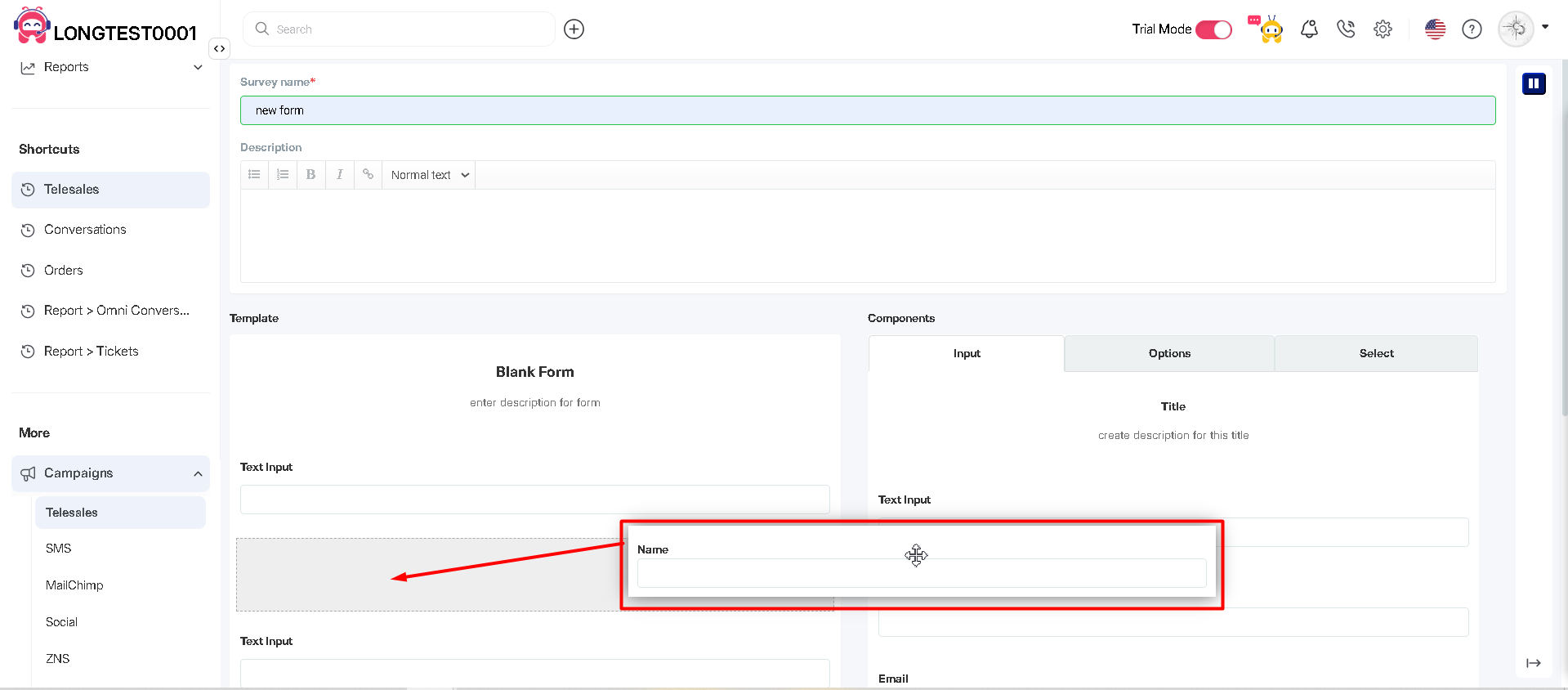
Kéo thả để thêm các thành phần khảo sát vào Form\
(Drag and drop to add survey elements to the form.)

<figure><img src="https://2303854476-files.gitbook.io/~/files/v0/b/gitbook-x-prod.appspot.com/o/spaces%2FeTpJl0u63dzYBMNgXKfR%2Fuploads%2FjU1nJAlPva0a71K3WI9w%2Fimage.png?alt=media&#x26;token=351a0df1-cf7a-4e87-92d7-b6e8c84d4ce9" alt=""><figcaption></figcaption></figure>

<figure><img src="https://2303854476-files.gitbook.io/~/files/v0/b/gitbook-x-prod.appspot.com/o/spaces%2FeTpJl0u63dzYBMNgXKfR%2Fuploads%2F2bKkBR7e5dijBid6FeCQ%2Fimage.png?alt=media&#x26;token=d4d2ea21-e0e1-494d-a76a-15b406be95aa" alt=""><figcaption></figcaption></figure>

**2.6. Thiết lập thông báo và email khi nhân viên được phân công khách hàng.**\
**(Settings notifications and emails when an Agent is assigned a customer.)**

Tính năng này giúp thông báo cho nhân viên Telesales biết được số lượng và thời điểm khách hàng phân công để việc khảo sát được trôi chảy, đầy đủ và hạn chế sự chậm trễ.\
(This feature notifies Telesales agent about the number and timing of assigned customers, ensuring a smooth, complete survey process and minimizing delays.)

<figure><img src="https://2303854476-files.gitbook.io/~/files/v0/b/gitbook-x-prod.appspot.com/o/spaces%2FeTpJl0u63dzYBMNgXKfR%2Fuploads%2FFRc7IDxqSgskvebqj5eQ%2Fimage.png?alt=media&#x26;token=08447a63-0a71-4ae1-9275-a6fce02332d6" alt=""><figcaption></figcaption></figure>

<figure><img src="https://2303854476-files.gitbook.io/~/files/v0/b/gitbook-x-prod.appspot.com/o/spaces%2FeTpJl0u63dzYBMNgXKfR%2Fuploads%2FfWpDcyoAaOpzqof1IvkJ%2Fimage.png?alt=media&#x26;token=cfed7f7b-d531-4496-a57d-11b339f8f5dc" alt=""><figcaption></figcaption></figure>

Diễn giải: \
(Explanation:)

\- Trong khoảng x giờ, nếu có khách hàng phân công cho nhân viên, sẽ có thông báo và email gửi về cho nhân viên đó hoặc kèm theo cả Quản trị viên trong chiến dịch và CC cho email bất kỳ nào quan tâm, nội dung email như sau: \
(Within X hours, if a customer is assigned to an agent, a notification and email will be sent to that agent. The email can also be sent to the campaign administrator and CC'd to any other relevant email addresses. The email content is as follows:))

<figure><img src="https://2303854476-files.gitbook.io/~/files/v0/b/gitbook-x-prod.appspot.com/o/spaces%2FeTpJl0u63dzYBMNgXKfR%2Fuploads%2FIxc96BKTEHHiQ2jDU8IX%2Fanh33.png?alt=media&#x26;token=940a961c-1d0a-4b81-a809-cc99fd0f1be2" alt=""><figcaption></figcaption></figure>

**3. Chạy chiến dịch Telesales**\
**(Running the Telesales Campaign)**

Sau khi các thiết lập được hoàn tất, nhân viên Telesales nhận được thông báo/email phân công khách hàng, nhấn vào đường dẫn tại Email/ thông báo để đến Trang danh sách khách hàng của chiến dịch đó.\
(Once the setup is complete, Telesales agents will receive a notification/email about their assigned customers. They can click the link in the email/notification to access the customer list page for that campaign.)

Hoặc nhân viên có thể truy cập vào chiến dịch bằng cách:\
(Alternatively, agents can access the campaign by:)

Tại menu bên trái, nhấn vào **Chiến dịch** → **Telesales** → trang hiển thị danh sách chiến dịch Telesales mà nhân viên đó tham gia → nhấn vào tên chiến dịch để đến trang khảo sát\
(at the the left menu click into **Campaigns** → **Telesales** → A page displaying the Telesales campaigns they are participating in will appear → Clicking on the campaign name to go to the survey page.)

<figure><img src="https://2303854476-files.gitbook.io/~/files/v0/b/gitbook-x-prod.appspot.com/o/spaces%2FeTpJl0u63dzYBMNgXKfR%2Fuploads%2Fwbd8UqeBkLbkuUuw6C6O%2Fimage.png?alt=media&#x26;token=33ec4435-d6b5-46a7-83fe-44956a0207bf" alt=""><figcaption></figcaption></figure>

<figure><img src="https://2303854476-files.gitbook.io/~/files/v0/b/gitbook-x-prod.appspot.com/o/spaces%2FeTpJl0u63dzYBMNgXKfR%2Fuploads%2FjqN9oiiWmc1M5dgM1Gqj%2Fimage.png?alt=media&#x26;token=97b67454-7057-4578-b0eb-21683276b8e2" alt=""><figcaption></figcaption></figure>

<mark style="color:red;">LƯU Ý:</mark> \ <mark style="color:red;">(ATTENTION)</mark>

* Nhân viên có thể nhìn thấy danh sách khách hàng được phân công cho chính mình và khách hàng chưa được phân công\
  (Agents can see the list of customers assigned to them and unassigned customers.)
* Nhân viên có thể  khảo sát danh sách khách hàng được phân công cho chính mình\
  (Agents can only conduct surveys on customers assigned to them.)
* Admin có quyền xem chiến dịch thì sẽ được nhìn thấy toàn bộ khách hàng có trong chiến dịch nhưng chỉ được khảo sát khách hàng phân công cho chính mình.\
  (Admins with campaign access can view all customers in the campaign but can only survey their assigned customers.)
* Owner nhìn thấy toàn bộ khách hàng có trong chiến dịch nhưng chỉ được khảo sát khách hàng phân công cho chính mình.\
  (Owners can see all customers in the campaign but can only survey their assigned customers.)

**Gọi trong chiến dịch:**\
**(Making Calls in the Campaign:)**

Để thực hiện khảo sát, nhân viên có thể nhấn vào nút Telesales hoặc thực hiện gọi khách hàng, popup Khảo sát sẽ bật lên\
(To conduct a survey, agents can either click the Telesales button or manually call the customer. The Survey popup will then appear.)

<figure><img src="https://2303854476-files.gitbook.io/~/files/v0/b/gitbook-x-prod.appspot.com/o/spaces%2FeTpJl0u63dzYBMNgXKfR%2Fuploads%2FzACny2RhgaGhbZ5v5t91%2Fimage.png?alt=media&#x26;token=647055ea-d593-4785-9663-6b2e2d5c15a7" alt=""><figcaption></figcaption></figure>

<figure><img src="https://2303854476-files.gitbook.io/~/files/v0/b/gitbook-x-prod.appspot.com/o/spaces%2FeTpJl0u63dzYBMNgXKfR%2Fuploads%2F8uxXs4xbqZOScTElVEHZ%2Fimage.png?alt=media&#x26;token=b6b2f8d8-da36-4ce7-91e4-369e99850199" alt=""><figcaption></figcaption></figure>

<figure><img src="https://2303854476-files.gitbook.io/~/files/v0/b/gitbook-x-prod.appspot.com/o/spaces%2FeTpJl0u63dzYBMNgXKfR%2Fuploads%2FtkaDZVg8vAYOHqj6jfQ3%2Fimage.png?alt=media&#x26;token=c8a3ebca-0891-4847-9127-28edc7fe1c00" alt=""><figcaption></figcaption></figure>

<figure><img src="https://2303854476-files.gitbook.io/~/files/v0/b/gitbook-x-prod.appspot.com/o/spaces%2FeTpJl0u63dzYBMNgXKfR%2Fuploads%2F4CsJau0EcJRJ7CYPwrrr%2Fimage.png?alt=media&#x26;token=1b832eeb-021a-4a68-9e6b-235d4c4258e3" alt=""><figcaption></figcaption></figure>

Thực hiện khảo sát và điền vào form theo dữ liệu thu được\
(Conduct the survey and fill out the form based on the collected data.)

Chọn trạng thái phù hợp và nhấn **Lưu**\
(Select the appropriate status and click Save.)

Đóng popup và tiếp tục khảo sát khách hàng tiếp theo.\
(Close the popup and proceed with the next customer survey.)

<figure><img src="https://2303854476-files.gitbook.io/~/files/v0/b/gitbook-x-prod.appspot.com/o/spaces%2FeTpJl0u63dzYBMNgXKfR%2Fuploads%2FMetXe15zQIk22CvytRs1%2Fimage.png?alt=media&#x26;token=45b10db6-2499-4150-8caf-f8ca4fa05b08" alt=""><figcaption></figcaption></figure>

<figure><img src="https://2303854476-files.gitbook.io/~/files/v0/b/gitbook-x-prod.appspot.com/o/spaces%2FeTpJl0u63dzYBMNgXKfR%2Fuploads%2FLoR13GadY8DRX8FSw1Sc%2Fimage.png?alt=media&#x26;token=1354142c-81a0-4c5c-b525-a1c54c0a0500" alt=""><figcaption></figcaption></figure>

**Phân công cho Tôi:**\
**(Assign to Me:)**

Nhân viên có thể tự lấy data gọi về cho mình bằng cách chọn khách hàng và nhấn Phân công cho tôi\
(Agent can retrieve data for themselves by selecting a customer and clicking Assign Me.)

<figure><img src="https://2303854476-files.gitbook.io/~/files/v0/b/gitbook-x-prod.appspot.com/o/spaces%2FeTpJl0u63dzYBMNgXKfR%2Fuploads%2FyO6eUVofND0IQEACvx2E%2Fimage.png?alt=media&#x26;token=17c509e0-2568-4be9-9896-19cb1ad95db6" alt=""><figcaption></figcaption></figure>

<figure><img src="https://2303854476-files.gitbook.io/~/files/v0/b/gitbook-x-prod.appspot.com/o/spaces%2FeTpJl0u63dzYBMNgXKfR%2Fuploads%2FkdCbDQFHBwtNKs9WK2Qe%2Fimage.png?alt=media&#x26;token=433b99c7-5b57-468f-aa65-fc9451fbf4a2" alt=""><figcaption></figcaption></figure>

Có thể chọn thủ công KH hoặc tìm kiếm khách hàng theo bộ lọc tuỳ chỉnh\
(Can manually select a customer or search for a customer using custom filters.)

<figure><img src="https://2303854476-files.gitbook.io/~/files/v0/b/gitbook-x-prod.appspot.com/o/spaces%2FeTpJl0u63dzYBMNgXKfR%2Fuploads%2FfAVSNSUdwFmKVAnGoiPJ%2Fimage.png?alt=media&#x26;token=cd7d4042-f4e8-4069-b5de-729ddf37739f" alt=""><figcaption></figcaption></figure>

<figure><img src="https://2303854476-files.gitbook.io/~/files/v0/b/gitbook-x-prod.appspot.com/o/spaces%2FeTpJl0u63dzYBMNgXKfR%2Fuploads%2FYEZUN9l5vsUiBGb2p0Cx%2Fimage.png?alt=media&#x26;token=042e0efc-f3d1-4eaf-aa9a-f7d8e538a9e5" alt=""><figcaption></figcaption></figure>

**4. Báo cáo Chiến dịch Telesales**\
**(Telesales Campaign Report)**

Sau quá trình tư vấn để giới thiệu sản phẩm/dịch vụ và giải đáp các thắc mắc của khách hàng trong suốt quá trình sử dụng; các nhân viên telesales cũng giúp tìm hiểu và giải quyết các vấn đề mà khách hàng chưa thoải mái hay chưa hài lòng về sản phẩm, dịch vụ của doanh nghiệp. Từ đó, bộ phận telesales sẽ tổng hợp ý kiến, kết hợp cùng bộ phận marketing để phân tích và nắm bắt được các ưu/nhược điểm của sản phẩm, tìm ra các chiến lược, kế hoạch giúp tăng doanh số và doanh thu cho doanh nghiệp. AntCRM cho phép bạn xem báo cáo một cách trực quan và dễ hiểu nhất, giúp việc phân tích trở nên nhanh chóng và chính xác.\
(After consulting to introduce products/services and addressing customer inquiries throughout their usage, telesales agents also help identify and resolve any concerns or dissatisfaction customers may have.Based on this, the telesales team compiles feedback and collaborates with the marketing department to analyze strengths and weaknesses, developing strategies and plans to boost sales and revenue.AntCRM provides a clear and intuitive reporting system, making analysis faster and more accurate.)

Tại trang Danh sách chiến dịch, nhấn vào nút **Báo cáo**\
**(**&#x4F;n the Campaign List page, click the **Report** button.)

(**Lưu ý:** Owner và Admin có quyền xem chiến dịch mới được phép xem báo cáo chiến dịch Telesales)\
(Note: Only Owners and Admins have permission to view telesales campaign reports.)

<figure><img src="https://2303854476-files.gitbook.io/~/files/v0/b/gitbook-x-prod.appspot.com/o/spaces%2FeTpJl0u63dzYBMNgXKfR%2Fuploads%2F0R06PV1Us1xm4pFTsPrf%2Fimage.png?alt=media&#x26;token=faa95f71-f02d-480a-a542-b5d8ffeb8735" alt=""><figcaption></figcaption></figure>

<figure><img src="https://2303854476-files.gitbook.io/~/files/v0/b/gitbook-x-prod.appspot.com/o/spaces%2FeTpJl0u63dzYBMNgXKfR%2Fuploads%2F7maGaPYAtJKtzVk5n9cR%2Fimage.png?alt=media&#x26;token=912e84b8-4612-4143-8d14-e1b0a80d0ed5" alt=""><figcaption></figcaption></figure>

Trang chuyển đến xem báo cáo chiến dịch, gồm có các mục báo cáo như sau:\
(The page redirects to the Campaign Report view, which includes the following report sections:)

* **Tổng quan** - Thống kê khách hàng theo trạng thái \
  (**Overview** – Statistics on customers by status.)
* **Nhân viên** - Thống kê hiệu suất agent làm việc theo chiến dịch\
  (**User** – Performance metrics of agents working on the campaign.)
* **Lịch sử cuộc gọi** - Báo cáo trích xuất chi tiết cuộc gọi và ghi âm cuộc gọi theo chiến dịch\
  (**Call History** – Detailed reports on call logs and call recordings by campaign.)
* **Khảo sát** - Báo cáo và trích xuất kết quả khảo sát từ khách hàng\
  (**Survey** – Reports and extracted results from customer surveys.)

Bên dưới là các hình ví dụ về báo cáo:\
(Below are example images of the reports:)

**BÁO CÁO TỔNG QUAN**\
**(OVERVIEW REPORT)**

<figure><img src="https://2303854476-files.gitbook.io/~/files/v0/b/gitbook-x-prod.appspot.com/o/spaces%2FeTpJl0u63dzYBMNgXKfR%2Fuploads%2FXKKIW9qYbfrrwiRuXbot%2Fimage.png?alt=media&#x26;token=5e1c69b8-8490-41f5-9302-5aed598bf7a1" alt=""><figcaption></figcaption></figure>

<figure><img src="https://2303854476-files.gitbook.io/~/files/v0/b/gitbook-x-prod.appspot.com/o/spaces%2FeTpJl0u63dzYBMNgXKfR%2Fuploads%2Fs4GWDzE71eR69m97Covu%2Fimage.png?alt=media&#x26;token=2a864754-0028-4b2b-a96b-913b94ccb455" alt=""><figcaption></figcaption></figure>

**BÁO CÁO NHÂN VIÊN**\
**(USER REPORT)**

<figure><img src="https://2303854476-files.gitbook.io/~/files/v0/b/gitbook-x-prod.appspot.com/o/spaces%2FeTpJl0u63dzYBMNgXKfR%2Fuploads%2FEo1KAMy8sNK3T04wdQlg%2Fimage.png?alt=media&#x26;token=298c007a-78d6-4158-b51d-24eb8124b347" alt=""><figcaption></figcaption></figure>

<figure><img src="https://2303854476-files.gitbook.io/~/files/v0/b/gitbook-x-prod.appspot.com/o/spaces%2FeTpJl0u63dzYBMNgXKfR%2Fuploads%2FqQi4rhF6c5zKj2bKagY7%2Fimage.png?alt=media&#x26;token=2bdcf241-397c-49a5-9a7e-7a1705cab43d" alt=""><figcaption></figcaption></figure>

**BÁO CÁO TỔNG ĐÀI**\
**(CALL HISTORY REPORT)**

<figure><img src="https://2303854476-files.gitbook.io/~/files/v0/b/gitbook-x-prod.appspot.com/o/spaces%2FeTpJl0u63dzYBMNgXKfR%2Fuploads%2FYZpdXmruByCyzZwGNOu4%2Fimage.png?alt=media&#x26;token=0e8f6ac4-37a4-4d2f-ad5b-4e9c2c43e14b" alt=""><figcaption></figcaption></figure>

<figure><img src="https://2303854476-files.gitbook.io/~/files/v0/b/gitbook-x-prod.appspot.com/o/spaces%2FeTpJl0u63dzYBMNgXKfR%2Fuploads%2Fh2AorKeAKyy5c5OkVd3q%2Fimage.png?alt=media&#x26;token=f92c504a-1bfa-47e1-bb9a-c52a7aeb72bf" alt=""><figcaption></figcaption></figure>

\
**BÁO CÁO KHẢO SÁT**\
**(SURVEY REPORT)**

<figure><img src="https://2303854476-files.gitbook.io/~/files/v0/b/gitbook-x-prod.appspot.com/o/spaces%2FeTpJl0u63dzYBMNgXKfR%2Fuploads%2F7cmkc04W4BIQtrTxgrSA%2Fimage.png?alt=media&#x26;token=b7ef2407-71cb-4c7e-aa35-4817c247287f" alt=""><figcaption></figcaption></figure>

<figure><img src="https://2303854476-files.gitbook.io/~/files/v0/b/gitbook-x-prod.appspot.com/o/spaces%2FeTpJl0u63dzYBMNgXKfR%2Fuploads%2FdO3Nd8kMIsk2rt5jieAD%2Fimage.png?alt=media&#x26;token=6aea019c-0391-4665-9eff-2c083e0401ed" alt=""><figcaption></figcaption></figure>

**TÍNH NĂNG CẬP NHẬT:**\
**(**&#x46;eature Updates:)

**1. Thêm thiết lập trường thông tin hiển thị của popup telesale:**\
**(**&#x43;onfigure Display Fields in Telesales Popup)

Cho phép người thiết lập campaign điều chỉnh thông tin hiển thị trong popup telesale\
(This feature allows campaign managers to customize the information displayed in the telesales popup.)

**Bước 1:** Vào **Thiết lập** -> vào **Trường Thông Tin**\
**(**&#x47;o to **Settings** → **Information Fields.**)

<figure><img src="https://2303854476-files.gitbook.io/~/files/v0/b/gitbook-x-prod.appspot.com/o/spaces%2FeTpJl0u63dzYBMNgXKfR%2Fuploads%2F7DRo9S7B0CJY1E2NOsK3%2Fimage.png?alt=media&#x26;token=9649068c-8c8a-430b-80a7-8f1b9ae2ac71" alt=""><figcaption></figcaption></figure>

<figure><img src="https://2303854476-files.gitbook.io/~/files/v0/b/gitbook-x-prod.appspot.com/o/spaces%2FeTpJl0u63dzYBMNgXKfR%2Fuploads%2F9duiOmLMuN5RjCzb2EvK%2Fimage.png?alt=media&#x26;token=458a7516-55e6-47c6-96cc-a9351ae68c92" alt=""><figcaption></figcaption></figure>

<figure><img src="https://2303854476-files.gitbook.io/~/files/v0/b/gitbook-x-prod.appspot.com/o/spaces%2FeTpJl0u63dzYBMNgXKfR%2Fuploads%2FOd6A1fPaGowagqRw37mh%2Fimage.png?alt=media&#x26;token=a0eb2a6e-d331-4c51-a690-9800a68f7aad" alt=""><figcaption></figcaption></figure>

<figure><img src="https://2303854476-files.gitbook.io/~/files/v0/b/gitbook-x-prod.appspot.com/o/spaces%2FeTpJl0u63dzYBMNgXKfR%2Fuploads%2F7SFmEIKDybd4OdI3M3sF%2Fimage.png?alt=media&#x26;token=7373c6f3-1903-414f-8a58-8b6717cc5d49" alt=""><figcaption></figcaption></figure>

**Bước 2:** Chọn cột muốn thêm vào popup\
(Select the columns to be displayed in the telesales popup.)

<figure><img src="https://2303854476-files.gitbook.io/~/files/v0/b/gitbook-x-prod.appspot.com/o/spaces%2FeTpJl0u63dzYBMNgXKfR%2Fuploads%2FBYGpSDIubAPjaYUjeLHn%2Fimage.png?alt=media&#x26;token=6439d8bd-ba0b-4339-89d8-e47391c0a3e8" alt=""><figcaption></figcaption></figure>

<figure><img src="https://2303854476-files.gitbook.io/~/files/v0/b/gitbook-x-prod.appspot.com/o/spaces%2FeTpJl0u63dzYBMNgXKfR%2Fuploads%2FxpH4mRQT1ARKnwg3Fewi%2Fimage.png?alt=media&#x26;token=60fd4ab0-6b85-4297-8d3f-ae917573ac93" alt=""><figcaption></figcaption></figure>

**Bước 3:** Lưu\
(Click Save.)

Sau khi lưu thiết lập, người dùng thực hiện telesale thì các cột mong muốn được hiển thị trong telesale popup\
(After saving, the selected columns will appear in the telesales popup during telesales operations.)

<figure><img src="https://2303854476-files.gitbook.io/~/files/v0/b/gitbook-x-prod.appspot.com/o/spaces%2FeTpJl0u63dzYBMNgXKfR%2Fuploads%2F515a6n42kfCOmwHQ4vO3%2Fimage.png?alt=media&#x26;token=fbc17100-5710-43da-9074-015b05c4b3d6" alt=""><figcaption></figcaption></figure>

<figure><img src="https://2303854476-files.gitbook.io/~/files/v0/b/gitbook-x-prod.appspot.com/o/spaces%2FeTpJl0u63dzYBMNgXKfR%2Fuploads%2FtSrQp6EFwzkMNxbw80GU%2Fimage.png?alt=media&#x26;token=3797220a-584e-479c-a11d-ed7b664bc992" alt=""><figcaption></figcaption></figure>

**2.1. Thêm chức năng tạo danh sách mẫu trạng thái chung cho Telelsales**\
**(Create a Common Status List for Telesales)**\
This feature enables users to create a predefined status list that can be used across all telesales campaigns.

**Bước 1:** Vào **Thiết lập -> Trạng thái**\
**(Step 1:** Go to **Settings** → **Stages**.)

<figure><img src="https://2303854476-files.gitbook.io/~/files/v0/b/gitbook-x-prod.appspot.com/o/spaces%2FeTpJl0u63dzYBMNgXKfR%2Fuploads%2Fl9wf8L1ISVSlR7pJAJtz%2Fimage.png?alt=media&#x26;token=745bba1e-d7bb-4517-a190-91e852d8c09f" alt=""><figcaption></figcaption></figure>

<figure><img src="https://2303854476-files.gitbook.io/~/files/v0/b/gitbook-x-prod.appspot.com/o/spaces%2FeTpJl0u63dzYBMNgXKfR%2Fuploads%2FypmCcsFoDP98NMEWa9kE%2Fimage.png?alt=media&#x26;token=79145f1c-bb47-4737-95bf-3c5e3c90e37c" alt=""><figcaption></figcaption></figure>

**Bước 2:** Nhập tên trạng thái muốn tạo\
\&#xNAN;**(Step 2:** Enter the desired status name.)

**Bước 3:** Bấm nút **Thêm trạng thái**. Tại bước này người dùng tạo các trạng thái mong muốn\
\&#xNAN;**(Step 3:** Click **Add Status** to create multiple statuses as needed.)

**Bước 4:** Bấm nút **Thêm**\
**(Step 4:** Click **Add** butto&#x6E;**)**

<figure><img src="https://2303854476-files.gitbook.io/~/files/v0/b/gitbook-x-prod.appspot.com/o/spaces%2FeTpJl0u63dzYBMNgXKfR%2Fuploads%2FemMk2S9yLjFhDuyicYC3%2F7.jpg?alt=media&#x26;token=13e56686-1ea3-4846-9536-1f55cbacd4fd" alt=""><figcaption></figcaption></figure>

<figure><img src="https://2303854476-files.gitbook.io/~/files/v0/b/gitbook-x-prod.appspot.com/o/spaces%2FeTpJl0u63dzYBMNgXKfR%2Fuploads%2FKsv4DjMkZCNky8S67ugR%2Fe7.jpg?alt=media&#x26;token=bd4fa129-a9e1-46a6-b92a-925448561849" alt=""><figcaption></figcaption></figure>

**Bước 5:** Nhập tên của danh sách\
(**Step 5:** Enter a name for the status list.)

<figure><img src="https://2303854476-files.gitbook.io/~/files/v0/b/gitbook-x-prod.appspot.com/o/spaces%2FeTpJl0u63dzYBMNgXKfR%2Fuploads%2FmVg1fAveKiH0FNtxEoiU%2Fimage.png?alt=media&#x26;token=1bdc9ec5-aeda-4404-b224-75956d5d2b84" alt=""><figcaption></figcaption></figure>

<figure><img src="https://2303854476-files.gitbook.io/~/files/v0/b/gitbook-x-prod.appspot.com/o/spaces%2FeTpJl0u63dzYBMNgXKfR%2Fuploads%2FpHaWOLKRum95Jyx7991J%2Fimage.png?alt=media&#x26;token=39def801-9e5b-425f-9d7e-f16dcdd8ecdd" alt=""><figcaption></figcaption></figure>

**Bước 6:** Bấm nút **Thêm**\
**(Step 6:** Click **Add**)

<figure><img src="https://2303854476-files.gitbook.io/~/files/v0/b/gitbook-x-prod.appspot.com/o/spaces%2FeTpJl0u63dzYBMNgXKfR%2Fuploads%2FmDslxFjbUz4HXv9pxZfy%2Fimage.png?alt=media&#x26;token=60941e26-8329-4d12-b0b3-d80ee2e5e3bf" alt=""><figcaption></figcaption></figure>

<figure><img src="https://2303854476-files.gitbook.io/~/files/v0/b/gitbook-x-prod.appspot.com/o/spaces%2FeTpJl0u63dzYBMNgXKfR%2Fuploads%2FP1RXLvQkPvIWQcQhSAET%2Fimage.png?alt=media&#x26;token=95100141-705d-4dc9-9156-03f03cfb9be7" alt=""><figcaption></figcaption></figure>

**2.2: Sử dụng mẫu danh sách trạng thái đã tạo**\
**(**&#x32;.2. Use a Predefined Status List)

**2.2.1: Sử dụng mẫu danh sách trạng thái cho chiến dịch**\
**(2.2.1. Apply a Status List to a Campaign)**

**Bước 1:** Vào **Thiết lập ->** vào **Trạng thái**\
(**Step 1:**&#x47;o to Settings → Status.)

**Bước 2:** Chọn mẫu trạng thái mong muốn\
(**Step 2:**&#x53;elect the desired status list.)

<figure><img src="https://2303854476-files.gitbook.io/~/files/v0/b/gitbook-x-prod.appspot.com/o/spaces%2FeTpJl0u63dzYBMNgXKfR%2Fuploads%2FGmcsu76hUtbD5lXYmEVf%2Fimage.png?alt=media&#x26;token=0af9274d-d955-47bf-a3d8-2560b58c078e" alt=""><figcaption></figcaption></figure>

<figure><img src="https://2303854476-files.gitbook.io/~/files/v0/b/gitbook-x-prod.appspot.com/o/spaces%2FeTpJl0u63dzYBMNgXKfR%2Fuploads%2FkuMwCvWVHsmpLiAczHm3%2Fimage.png?alt=media&#x26;token=f655af8f-8eea-4833-ac8a-256e2074251a" alt=""><figcaption></figcaption></figure>

**Bước 3:** Hệ thống tự động lưu thiết lập\
(**Step 3:**&#x54;he system will automatically save the configuration.)

<figure><img src="https://2303854476-files.gitbook.io/~/files/v0/b/gitbook-x-prod.appspot.com/o/spaces%2FeTpJl0u63dzYBMNgXKfR%2Fuploads%2Fvel2PDbNIHOCfPvuszS4%2Fimage.png?alt=media&#x26;token=8787fd49-c11c-44eb-949f-3a43ec91ad75" alt=""><figcaption></figcaption></figure>

<figure><img src="https://2303854476-files.gitbook.io/~/files/v0/b/gitbook-x-prod.appspot.com/o/spaces%2FeTpJl0u63dzYBMNgXKfR%2Fuploads%2FgVr2CWqAGbtOSk1dOrvm%2Fimage.png?alt=media&#x26;token=8e527e4f-fda2-4aba-9f76-186fd025e81f" alt=""><figcaption></figcaption></figure>

**2.2.2: Chỉnh sửa/Xóa mẫu danh sách trạng thái cho chiến dịch**\
**(**&#x32;.2.2. Edit/Delete stage templates)

**2.2.2.1: Xóa mẫu danh sách**\
**2.2.2.1. Delete a stage templates List**

**Bước 1:** Chọn mẫu danh sách cần xóa\
(**Step 1:** Select the stage templates list you want to delete.)

**Bước 2**: Bấm nút **XÓA**\
**(Step 2:** Click **Delete**.)

<figure><img src="https://2303854476-files.gitbook.io/~/files/v0/b/gitbook-x-prod.appspot.com/o/spaces%2FeTpJl0u63dzYBMNgXKfR%2Fuploads%2Fgazg37vaDTfuePdUTKsj%2F8.jpg?alt=media&#x26;token=6ec067cc-5a9f-4a20-8036-06f1c11ba93f" alt=""><figcaption></figcaption></figure>

<figure><img src="https://2303854476-files.gitbook.io/~/files/v0/b/gitbook-x-prod.appspot.com/o/spaces%2FeTpJl0u63dzYBMNgXKfR%2Fuploads%2FL035znTSmG5EVXko99Zy%2Fe8.jpg?alt=media&#x26;token=8c35dfad-7bc8-47d0-84d4-20f4f5b6afb9" alt=""><figcaption></figcaption></figure>

**2.2.2.2: Cập nhật mẫu trạng thái**\
**(2.2.2.2: Update a Stage template)**

**Bước 1:** Chọn mẫu trạng thái cần cập nhật\
(**Step 1:** Select the **Stage template**)

<figure><img src="https://2303854476-files.gitbook.io/~/files/v0/b/gitbook-x-prod.appspot.com/o/spaces%2FeTpJl0u63dzYBMNgXKfR%2Fuploads%2FK7iC7OxAL98YK7W4CGGE%2Fimage.png?alt=media&#x26;token=f356b97a-8f08-4fab-8749-43b0953886f2" alt=""><figcaption></figcaption></figure>

<figure><img src="https://2303854476-files.gitbook.io/~/files/v0/b/gitbook-x-prod.appspot.com/o/spaces%2FeTpJl0u63dzYBMNgXKfR%2Fuploads%2F5k49n2UZhb0wrw1opE1T%2Fimage.png?alt=media&#x26;token=e499c47d-6900-4a3c-8c5c-37a187a3ff24" alt=""><figcaption></figcaption></figure>

**Bước 2:** Thêm trạng thái cho danh sách hoặc chỉnh sửa/xóa trạng thái có sẵn\
(**Step 2:**&#x41;dd new stage or edit/delete existing stage .)

<figure><img src="https://2303854476-files.gitbook.io/~/files/v0/b/gitbook-x-prod.appspot.com/o/spaces%2FeTpJl0u63dzYBMNgXKfR%2Fuploads%2F6ZNj26gSSgwUyVz4J1YG%2Fimage.png?alt=media&#x26;token=73f85b41-0e20-402c-8f45-e4ceef4ac4dd" alt=""><figcaption></figcaption></figure>

<figure><img src="https://2303854476-files.gitbook.io/~/files/v0/b/gitbook-x-prod.appspot.com/o/spaces%2FeTpJl0u63dzYBMNgXKfR%2Fuploads%2FNf4hwFEju8pagbyKN00l%2Fimage.png?alt=media&#x26;token=2280d410-a016-445e-93cf-a45e94553375" alt=""><figcaption></figcaption></figure>

**Bước 3**: Bấm **Cập Nhật**\
**(Step 3:** Click Update to save the changes.)

<figure><img src="https://2303854476-files.gitbook.io/~/files/v0/b/gitbook-x-prod.appspot.com/o/spaces%2FeTpJl0u63dzYBMNgXKfR%2Fuploads%2FBi6Kiux3Am31aBANNNbC%2Fimage.png?alt=media&#x26;token=5e68d664-6aaf-44e2-929c-a54cb3b39cb3" alt=""><figcaption></figcaption></figure>

<figure><img src="https://2303854476-files.gitbook.io/~/files/v0/b/gitbook-x-prod.appspot.com/o/spaces%2FeTpJl0u63dzYBMNgXKfR%2Fuploads%2FNnFKOAyz504Tb1kODEX4%2Fimage.png?alt=media&#x26;token=4b5859f1-5dac-4f76-a669-5098cf58f744" alt=""><figcaption></figcaption></figure>