# Hướng dẫn khởi tạo chiến dịch Social Facebook (Instructions for creating a Facebook Social campaign)

**Bước 1:** Vào Chiến dịch -> Social -> Facebook\
(**Step 1**: Go to Campaign -> Social -> Facebook)

<figure><img src="/files/uixixzYlokNhkKsne5mf" alt=""><figcaption></figcaption></figure>

<figure><img src="/files/k1izi75w2bN4q5UYXUgu" alt=""><figcaption></figcaption></figure>

**Bước 2:** Tại Tab Chiến Dịch -> chọn Tạo Chiến Dịch\
(**Step 2:** At Campaign tab -> choose Create campaign)

<figure><img src="/files/vNYCmxea14Q698ZEXO8j" alt=""><figcaption></figcaption></figure>

<figure><img src="/files/PzTuFCUdpbfvbaRzlRxs" alt=""><figcaption></figcaption></figure>

**Bước 3:** Điền thông tin cho chiến dịch -> Tùy chọn gửi -> chọn Tạo Mới\
(**Step 3:** Fill in the information for the campaign -> choose Send date -> choose Create)

<figure><img src="/files/NIdm1Wmk9WqI8y1ZGRyU" alt=""><figcaption></figcaption></figure>

<figure><img src="/files/Z0zjtF8PrDz3I28hQc9o" alt=""><figcaption></figcaption></figure>

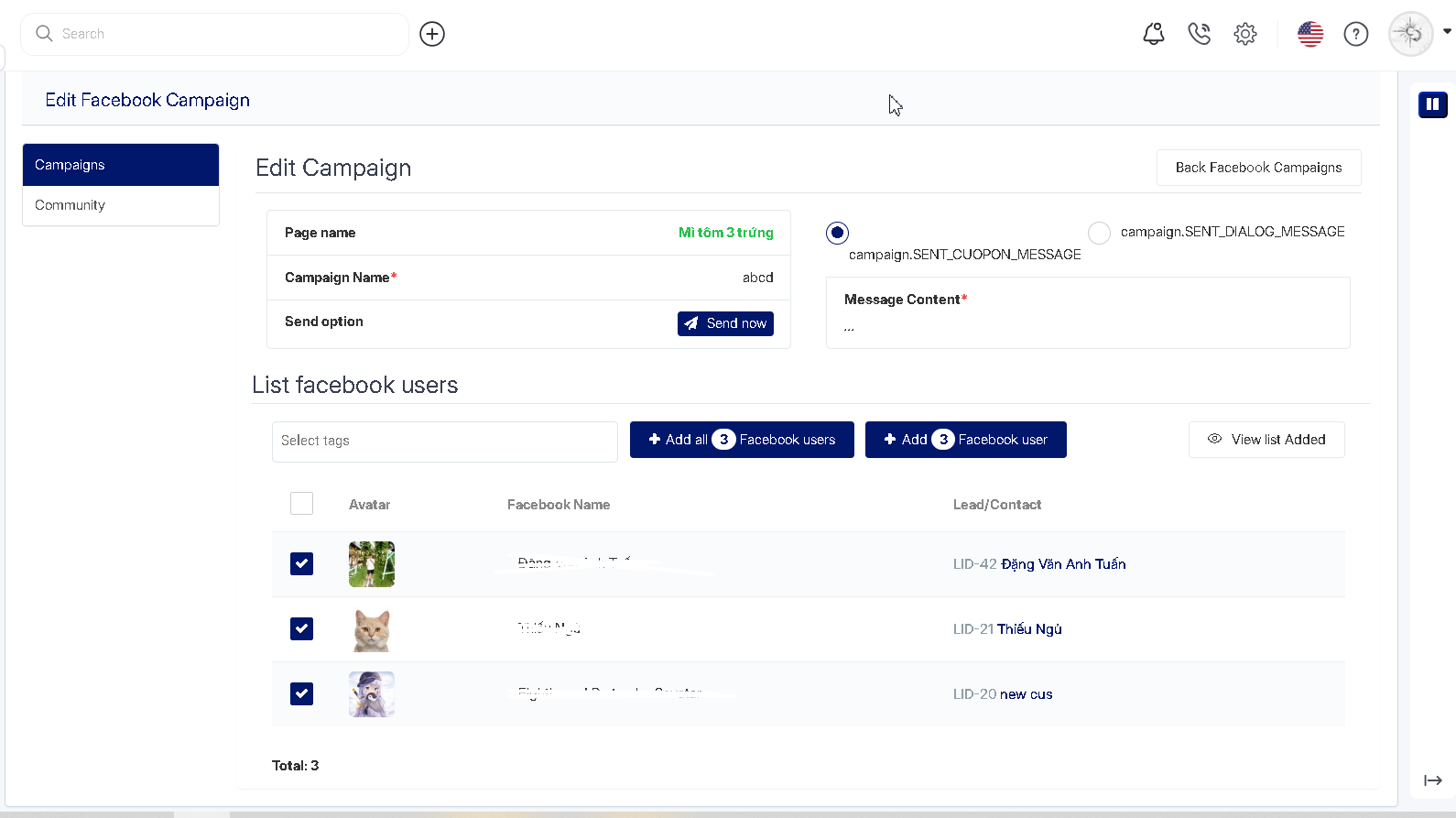
**Bước 4:** Thêm tài khoản Facebook vào chiến dịch\
(**Step 4**: Add a Facebook account to the campaign)

<figure><img src="/files/9MSNrJBVsdv2OB4kuSKW" alt=""><figcaption></figcaption></figure>

**Bước 5:** Tại danh sách tài khoản Facebook, chọn tài khoản nào muốn đưa vào chiến dịch\
(**Step 5:** In the list of Facebook accounts, select which account you want to include in the campaign)

<figure><img src="/files/AoT9jraM9bHj0IVDdfQY" alt=""><figcaption></figcaption></figure>

<figure><img src="/files/XSHb81U4RgdgHSd6A6n9" alt=""><figcaption></figcaption></figure>

**Bước 6:** Chọn thêm tất cả tài khoản ![](https://huongdan.antbuddy.com/uploads/images/iVBORw0K16328035540536945934561560295.png) hoặc thêm tài khoản được lựa chọn ![](https://huongdan.antbuddy.com/uploads/images/iVBORw0K16328035540537182307533139226.png)\
(**Step 6**: Choose add all accounts![](https://lh7-rt.googleusercontent.com/docsz/AD_4nXcXGdh3G6VI2-I_epJInToghUEAWVSadOj4wpl1T4kPDz0oua9tMIWwSO-d8YxUDxm7WRVaeUQq0xrmhDpK86E5Vchkhqo1MJEHzwkrRnM3_EPM9vUtFEvp5W9diq3DQdT4flSpkjWOj5dRgUKWlePBfxFD?key=B5q4U_-pDj2jRfAppuacNw) or add chosen account ![](https://lh7-rt.googleusercontent.com/docsz/AD_4nXdHirRM_MzcyIwHJKVsnjtaAANmDSvzImPbpfqgrVESZb7fvNlngm6m8TGPUnbA8HZOeCNduDokyv6EybbraSLg1tUcYrWOZ35TDT_ZS34SBPCyRAbjFNDXo4r-uEFk1hl1eyQcvN_6-dK_Xvc9HCc_Yd6K?key=B5q4U_-pDj2jRfAppuacNw))

**Bước 7**: Chọn Gửi ngay hoặc chờ đúng thời gian chạy chiến dịch đã chọn ở Bước 3\
(**Step 7**: Choose Send now or wait for the correct campaign run time chosen in Step 3)

<figure><img src="/files/MHOHdeLM6KiKxAFjeZdS" alt=""><figcaption></figcaption></figure>

<figure><img src="/files/tzKaOevV9nbRNXFBwj5A" alt=""><figcaption></figcaption></figure>


---

# Agent Instructions: Querying This Documentation

If you need additional information that is not directly available in this page, you can query the documentation dynamically by asking a question.

Perform an HTTP GET request on the current page URL with the `ask` query parameter:

```
GET https://docs.antbuddy.com/tai-lieu-antbuddy-huong-dan-su-dung-antbuddy-docs-user-guide/quan-tri-khach-hang-antcrm-antcrm-customer-management/chien-dich-campaign/huong-dan-khoi-tao-chien-dich-social-facebook-instructions-for-creating-a-facebook-social-campaign.md?ask=<question>
```

The question should be specific, self-contained, and written in natural language.
The response will contain a direct answer to the question and relevant excerpts and sources from the documentation.

Use this mechanism when the answer is not explicitly present in the current page, you need clarification or additional context, or you want to retrieve related documentation sections.