# Tạo nhiệm vụ, phiếu yêu cầu (Create task, tickets  )

1. Tạo nhiệm vụ\
   (Create task)

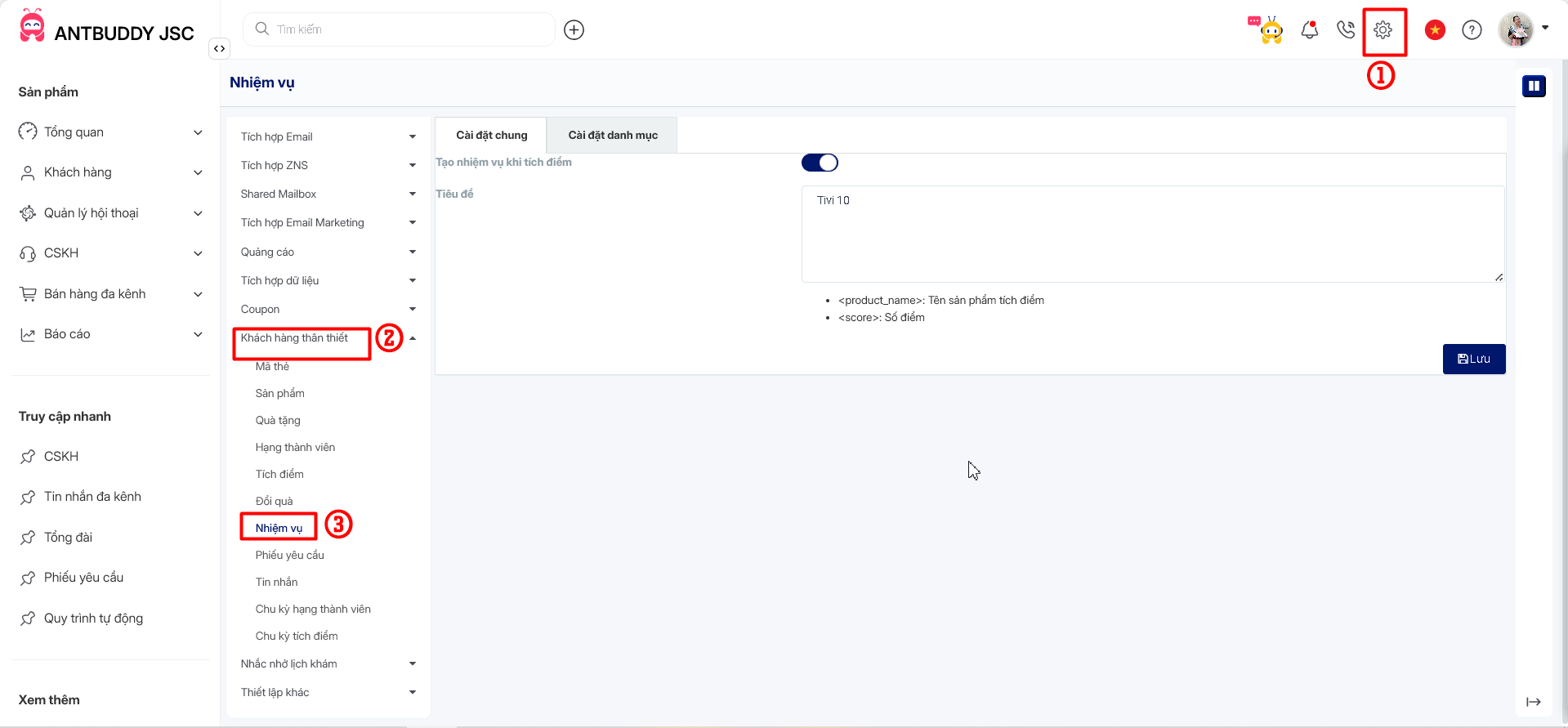
* Bước 1: Trên trang AntCRM, chọn Thiết lập, chọn tiếp Khách hàng thân thiết, sau đó chọn Nhiệm vụ\
  (Step 1: On AntCRM page, choose Settings, choose Loyalty, then choose Tasks)

<figure><img src="/files/iltaKXtQaEKn3raEGUIx" alt=""><figcaption></figcaption></figure>

<figure><img src="/files/qgOl56E1Nizc1CHidU56" alt=""><figcaption></figcaption></figure>

* **Bước 2:** Vào mục cài đặt chung, kích hoạt tạo nhiệm vụ khi tích điểm, nhập tiêu đề theo định dạng là tên sản phẩm tích điểm, số điểm, sau đó nhấn nút Lưu\
  (**Step 2**: Go to the general settings, activate task creation upon point accumulation, enter the title in the format of the product name and points earned, then click on<img src="https://lh7-rt.googleusercontent.com/docsz/AD_4nXf6vAPzyRRFyr8hUE-ttEJu289Nm38LhH9Zp0bZ-ySxrzcrizZ63nY9QNx-aZuFuLrU5Pk9LH-RARCoKo7LwluQBLF_SLz0UFnB68ARHPC0CVrTiOfGuBSYfY0-fQKL_sP_x4RaWQ?key=2FLI-8AdfVho_3ZLGtTthCi-" alt="" data-size="line">button)

<figure><img src="/files/MWC7ykNKMv7HBoMzDp4G" alt=""><figcaption></figcaption></figure>

<figure><img src="/files/clKLmj7kmmB0EkkyZsxe" alt=""><figcaption></figcaption></figure>

* Bước 3: Sau khi tạo nhiệm vụ thành công, nhiệm vụ sẽ hiển thị tại mục nhiệm vụ\
  (Step 3: After successfully creating a task, the task will be displayed in the task section.)

<figure><img src="/files/gibH2L4gT6iskScU0j9V" alt=""><figcaption></figcaption></figure>

* Mục cài đặt danh mục, chọn danh mục chăm sóc khách hàng sau đó bấm nút <img src="https://lh4.googleusercontent.com/OgqnRfFTZ7xtdtOB5eH6vbTctKoDNulpdz85P02TK2CViU3DemQ_RdPTsKz-L2lOsrOmtcCQx8UozHeCU7dN1M2oesHksOvpFCOjaYAi-894iNwghm1hGuNVylBs3vOM-k_Vnc_j4sSlzD9Fv5X6AYQ" alt="" data-size="line">\
  (In category settings, select the customer care category then click the button <img src="https://lh7-rt.googleusercontent.com/docsz/AD_4nXc75i8A3vRtC41UVwy7eOavVWllKDOspi3PIE3WrAwIlUxKazcUUu1V4QH2C2UA_BldTJQquhJOr1dhz96JAZFvRwmqGR-EifHyVHz-t00nVexmCrhlt56BHRHBvUEQHEIqxJjx?key=2FLI-8AdfVho_3ZLGtTthCi-" alt="" data-size="line">)

<figure><img src="/files/RBIl7GG1jYtywFpsDGyU" alt=""><figcaption></figcaption></figure>

<figure><img src="/files/2kqgvlpnid7yu90OM9mz" alt=""><figcaption></figcaption></figure>

2. Tạo phiếu sự vụ

* Tạo phiếu sự vụ khi khách hàng là khách hàng mới chưa có dữ liệu thông tin:
* Kích hoạt tạo phiếu sự vụ khi có khách hàng mới

<figure><img src="/files/Y80mo5O5T49gRfYuY7hi" alt=""><figcaption></figcaption></figure>

<figure><img src="/files/UbmgXvVVHI0YYQ6qw5Ku" alt=""><figcaption></figcaption></figure>

* Nhập tiêu đề sau đó nhấn Lưu

<figure><img src="/files/SpAXXX3sPPwCP7M7lTZJ" alt=""><figcaption></figcaption></figure>

<figure><img src="/files/N4R4ehYQLSseVaRb9LE4" alt=""><figcaption></figcaption></figure>

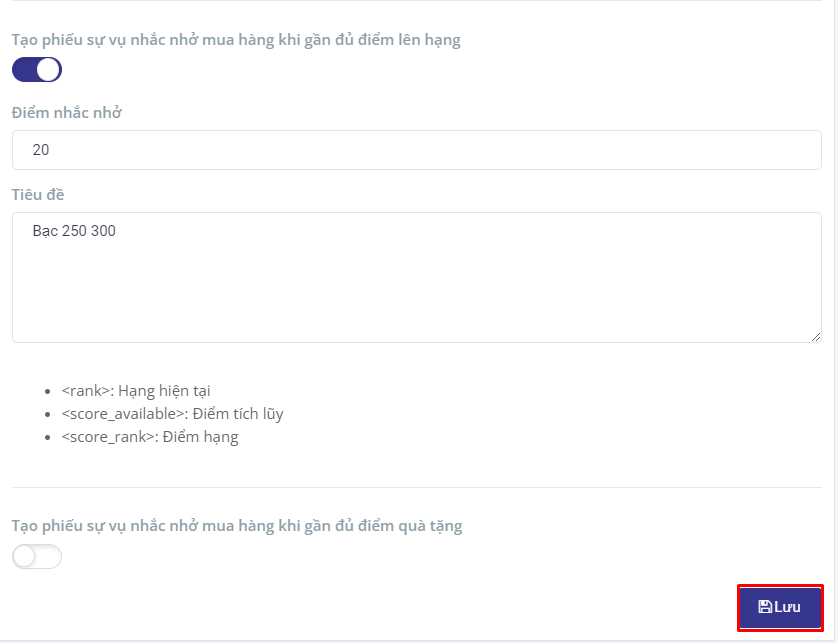
**Tạo phiếu sự vụ nhắc nhở mua hàng khi gần đủ điểm lên hạng:**

* Kích hoạt tạo phiếu sự vụ nhắc nhở mua hàng khi gần đủ điểm lên hạng
* Nhập điểm nhắc nhở
* Nhập tiêu đề theo định dạng là hạng hiện tại, điểm tích lũy, điểm hạng
* Nhấn nút Lưu

<figure><img src="https://lh5.googleusercontent.com/4sif0aDz899nh3ykg3R3j8PZY19RU5-MZwrgGLcS2bDbMF_PjYoQs7gBwDRRFF-v34O5-z9Vyo3k_AO5q85mXL0qIptCAXwd1NlSeev9OdXpQ3VUErUxZHiDw2X3WE8uAdPer3bo5h_h3cIJix0vaJQ" alt=""><figcaption></figcaption></figure>

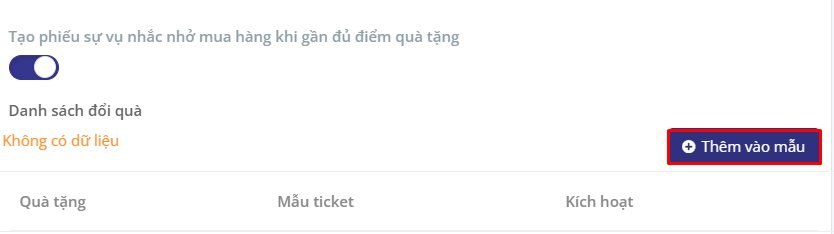
**Tạo phiếu sự vụ nhắc nhở mua hàng khi gần đủ điểm quà tặng:**

* Kích hoạt tạo phiếu sự vụ nhắc nhở mua hàng khi gần đủ điểm quà tặng
* Chọn Thêm vào mẫu

<figure><img src="https://lh5.googleusercontent.com/iBlmrCHIVagUlp1PmqYyRMdLEYWMekFMSdrX_dy6WTgVx-uA6h9zQhzNln_EBN9kRnk3OmAmWHQ1c0mgtzJyPd57NotCXXTE_1tgecEko09YZDjJqhY6B6h65_7mQAPXz_ouWQa6HTRE5AhW6iFeQNk" alt=""><figcaption></figcaption></figure>

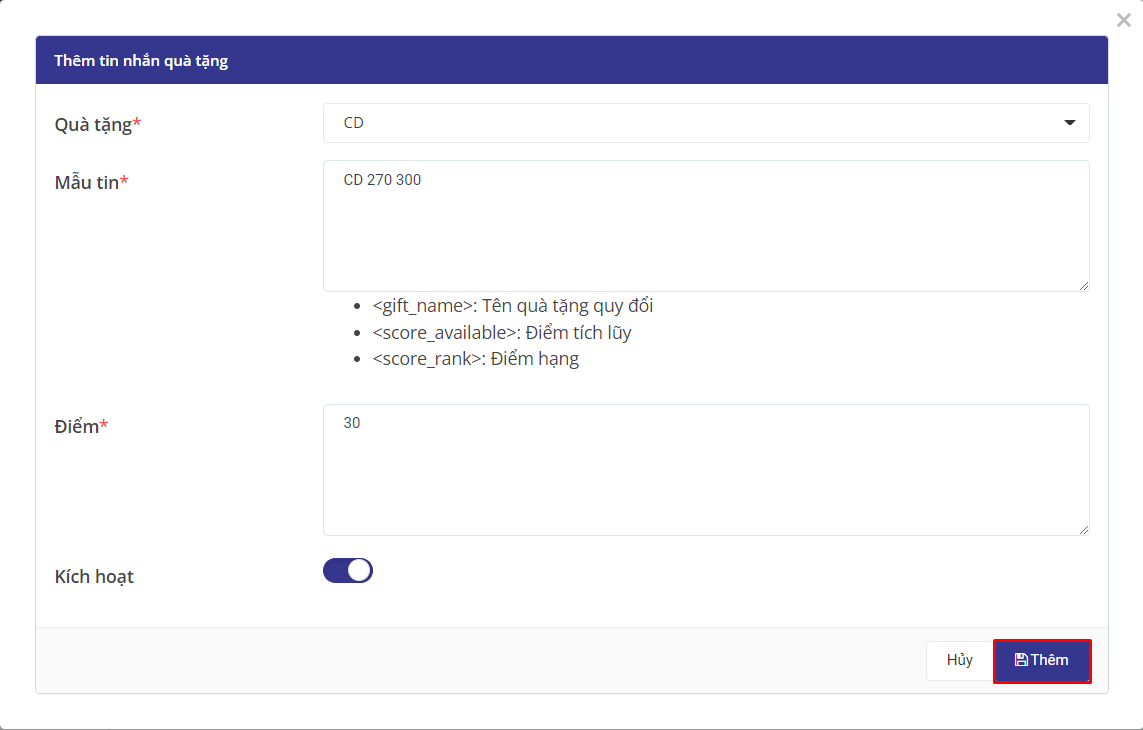
* Nhập các thông tin cần thiết vào trường thông tin, sau đó nhấn nút ![](https://lh6.googleusercontent.com/Uq6iShcGRH2dk0YW2oQ7rnENyCQZ4DiPiA2xVXRihxer98A1JR9V1B1s6BR98Tf7mM81ZH5hKEiw2cWh2ykNXEPAdG6XWyJC4cTU0UxXsqNrR8ZhQoCOdC80fcRzFRnt57SxkOebPpTQxnSiaaXv67g)

<figure><img src="https://lh5.googleusercontent.com/zISX9xFf55Fv5oSFVi1rUk9t_axGF9Q0Pr9FbfIO1KYyYReqGGpMf5VoDrJfFWQGqHdf3vBU0BmeV59V42alHmB1kKKJ7ZQnucHdeG2GCAkpmg_EjTnQRI4MyI_taHkUy-9pZ0UkV0ptg3rZ5kCj9Yc" alt=""><figcaption></figcaption></figure>

* Sau khi thêm thành công, quà tặng sẽ hiển thị tại danh sách đổi quà, người dùng có thể sửa đổi thông tin về sản phẩm bằng cách nhấn nút ![](https://lh6.googleusercontent.com/o_MC9O6EXFS_n6Kj82LZJLpSVjYVgGhOYW-9yyFdF4570rKactL5pfI39tVQg0QmzuFGp-zgE1JdOap1iuPu1JgtFrjDtehDZFbmqHPbjOJ_t6kYKRzmqyF66gOAPMIJarxLnmGGsl0eN0rvQE3ULog) và xóa sản phẩm bằng cách nhấn nút ![](https://lh5.googleusercontent.com/1LXmTYT-qUwwa87MZ0hBD7P53TIm80ClNhGHGfiYUgI4VBFzzij-EZi2FPvGJE1LT7-T0eTQtNJQFzG9d6tn0ALp0XcrSX7YwyOxyYTFzPZrcouQjdlLb3zy6wNaAg75asLAMjMDxSQRVfMMdJP_o4c)<br>

<figure><img src="https://lh5.googleusercontent.com/X_TdzFL5cH2c96FgEya_x677C-g4lyjhchkj3KqNoWqMgSUtLVa87K0QzXA8lxh6CcyInprlyrfLyUuB8wjeoc933Ylu_CyH_LKveU2fykaCAbdViyp8wsmgczGYJxDzAmb_OTI0fgLXRUyR0E61770" alt=""><figcaption></figcaption></figure>

* Mục cài đặt danh mục, chọn danh mục ticket khi khách hàng đổi quà sau đó nhấn nút Lưu
<figure><img src="https://lh5.googleusercontent.com/DSh_OF8fQVnQIpYNOIzbEI85rq6SRz1Aw8KgKigKmrsYLfKVYk2xHxEYofZBgoBjBLh_ZWRLvlo38JTXZeTgsGgAGnLnzcWmEbpIb5UgovcWsUYRy8uzUiynnFn32ci7We4QylK4CIucMrD4tbizNpk" alt=""><figcaption></figcaption></figure>

<br>


---

# Agent Instructions: Querying This Documentation

If you need additional information that is not directly available in this page, you can query the documentation dynamically by asking a question.

Perform an HTTP GET request on the current page URL with the `ask` query parameter:

```
GET https://docs.antbuddy.com/tai-lieu-antbuddy-huong-dan-su-dung-antbuddy-docs-user-guide/quan-tri-khach-hang-antcrm-antcrm-customer-management/khach-hang-than-thiet-loyalty/tao-nhiem-vu-phieu-yeu-cau-create-task-tickets.md?ask=<question>
```

The question should be specific, self-contained, and written in natural language.
The response will contain a direct answer to the question and relevant excerpts and sources from the documentation.

Use this mechanism when the answer is not explicitly present in the current page, you need clarification or additional context, or you want to retrieve related documentation sections.